 By
By Hide Sensitive Data with Client-Hidden Columns
You now have precise control over what data in your Data Tables reaches the client. With Client-Hidden Columns, you choose which columns to expose to the browser, helping prevent accidental exposure of sensitive fields.
What Are Client-Hidden Columns?
Client-hidden columns let you mark specific columns in your Data Tables so they are never accessible to the client, even on rows that have been returned to the client by server code.
Previously, when a row was returned from the server to the client, all columns in that row were included by default. Now you can hide sensitive fields like passwords or internal notes while keeping the rest of your data accessible.
To learn more about why sensitive data should stay on the server, see our guide on Client vs Server Code.
How They Work
When a column is client-hidden:
- Client code cannot access it
client_readable()andclient_writable()views automatically exclude it- Server code can still read and write the column, depending on the table’s permissions
- It is not just visual hiding – the data never reaches the browser
This works across all table permission levels, even for client-writable tables.
Safer Users Table by Default
Any new Users table created in your Anvil app will have only the email column client-visible by default. All other columns are hidden from the client. This means that most information about users is hidden when you call anvil.users.get_user() from client code:
user = anvil.users.get_user()

# Prints User's email
print(user['email'])

# Raises a "no such column" exception
print(user['password_hash'])
What You Should Do
- If you’re using the Users service: Existing Users tables keep their current settings, but new ones hide most data by default. Review your existing apps to see if you want to enable client-hidden columns on previously created Users tables.
- For all apps: Review your tables to identify columns that should be client-hidden.
Get Started
Client-hidden columns are available now in all Anvil apps:
- Open any Data Table.
- Click the icon next to the column you want to hide.
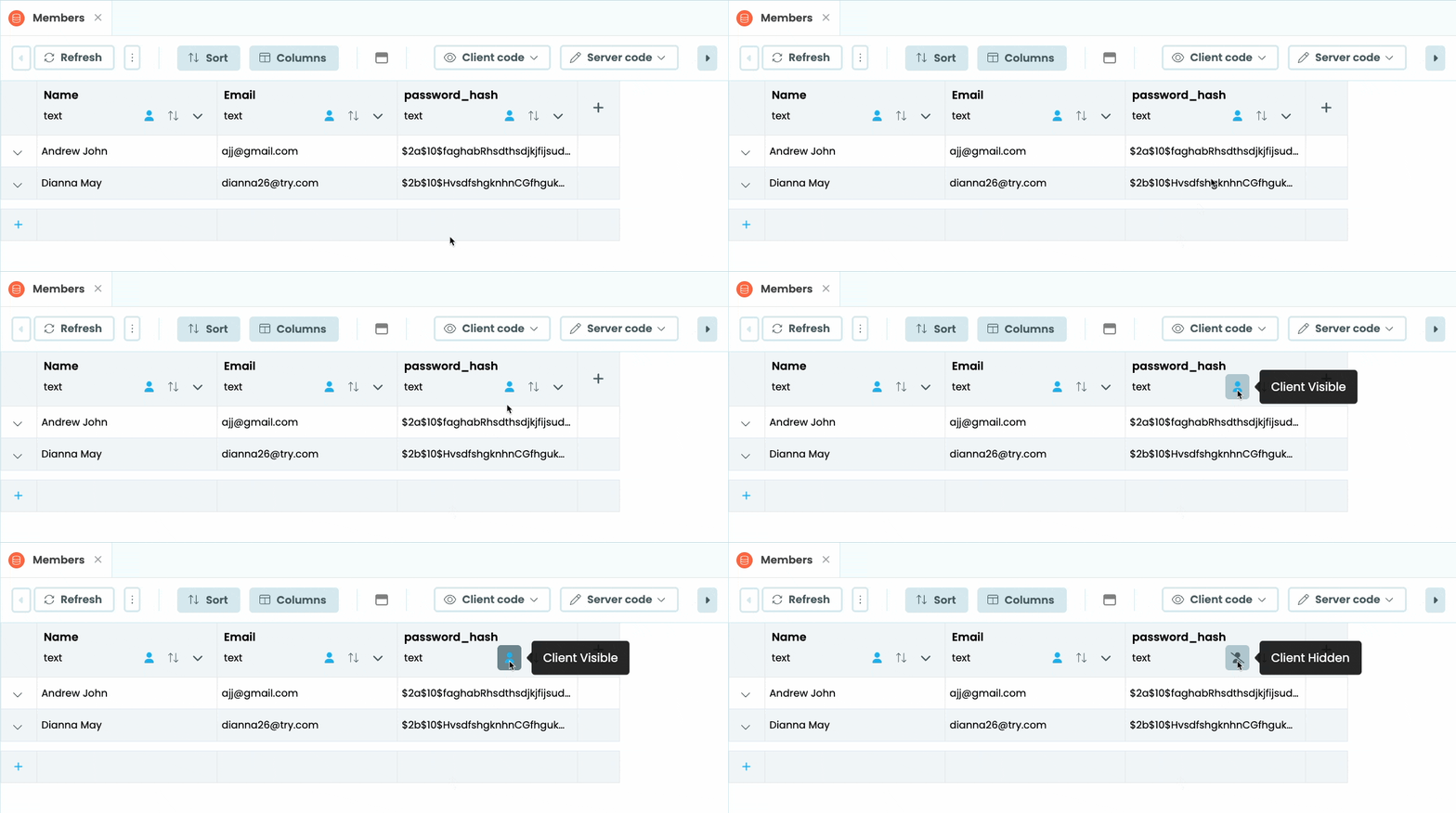
That’s it! The column is now inaccessible from the client.
Want to learn more?
More about Anvil
If you’re new here, welcome! Anvil is a platform for building full-stack web apps with nothing but Python. No need to wrestle with JS, HTML, CSS, Python, SQL and all their frameworks – just build it all in Python.
Want to build an app of your own? Get started with one of our tutorials:
Build Database-Backed Apps
Build a Simple Feedback Form
Build a Simple Feedback Form
Build a data-entry app, and learn the techniques fundamental to building any Anvil app. In this tutorial, you will:
- Build your User Interface
- Write client-side Python
- Write server-side Python
- Store data in a database
- Deploy your app