
 By
By How to build a simple HTTP API
Anvil is not just the easiest way to build web apps in Python. It is also a fully featured platform for building serverless apps and HTTP APIs.
Creating an HTTP endpoint in Anvil is simple. Just decorate a server function with @anvil.server.route and publish your app. Your API is instantly live on the internet, without having to host it anywhere.
In this tutorial, we will build a fully functional, authenticated REST API for a multi-user News Aggregator app.
Here is what we will cover:
- Return JSON data from your database
- Authenticate users so only authorised users can access your API
- Accept parameters in a POST request
- Create dynamic URLs with URL parameters
- Handle update and delete requests
- Explore advanced features: CORS, XSRF protection, cookies, and custom responses
Before you start
We will build an HTTP API on top of an existing multi-user News Aggregator app, a CRUD app where users can sign up, log in, add, and manage their own news articles.
To follow along, clone the starter app below:
Step 1: Return data from your database
We will start with the simplest endpoint: returning all the articles as an array of JSON objects. If you return a list of dictionaries from an endpoint function, Anvil automatically serialises it to JSON.
In the Server Module, define a function decorated with @anvil.server.route("/articles") that returns the title and content of every article in the articles table:
@anvil.server.route('/articles')
def get_all_articles():
  return [{'title': article['title'], 'content': article['content']}
    for article in app_tables.articles.search()]
The @anvil.server.route decorator makes your function callable over HTTP at the path you specify. In this case, a GET request to /articles returns all the articles in your database. The decorator also accepts optional arguments to control things like authentication and allowed HTTP methods, which we will introduce in later steps.
Test your endpoint
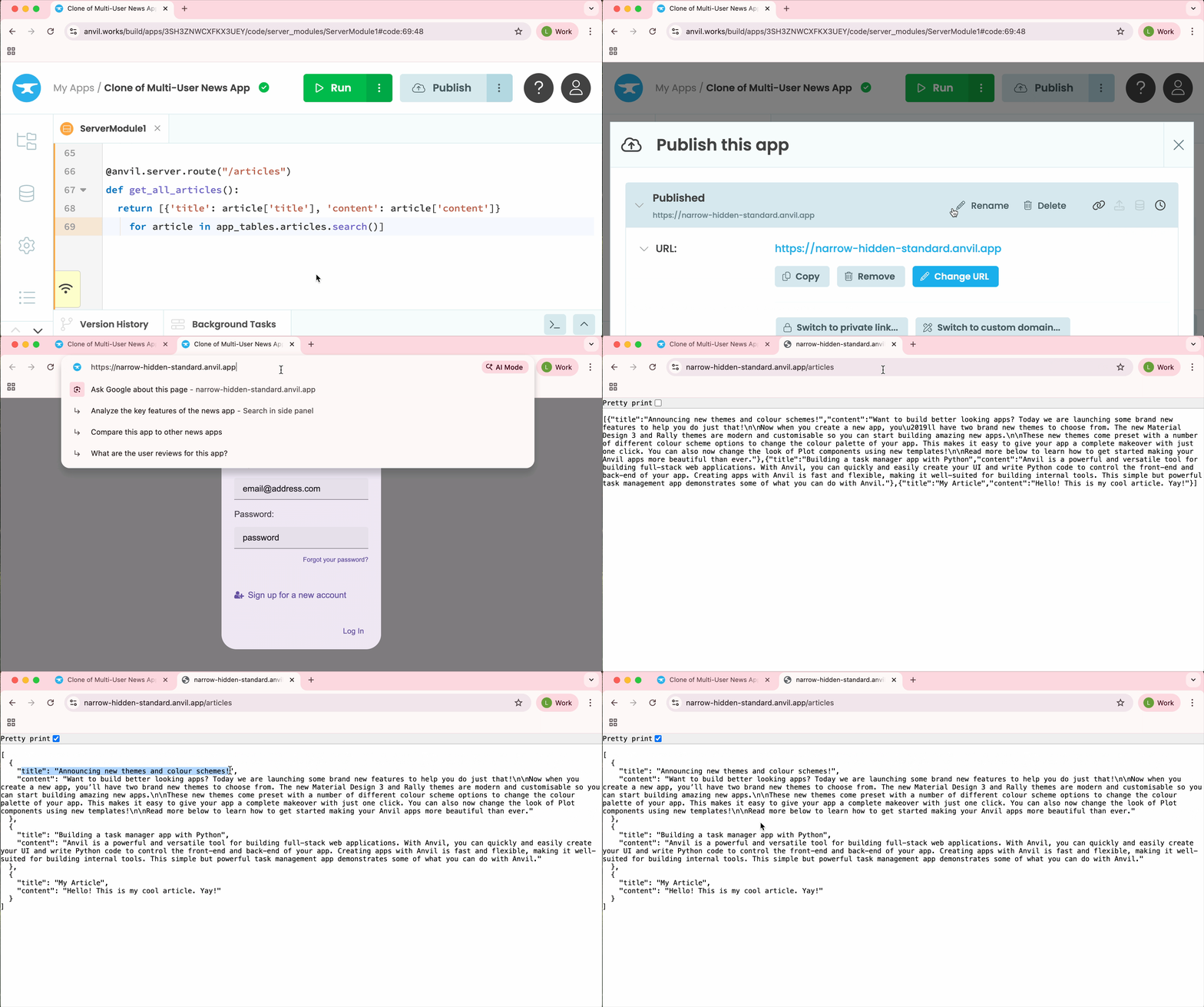
Once you have added the function, publish your app by clicking the Publish button at the top right of the editor. If you published at https://my-news-app.anvil.app, your endpoint is now live at https://my-news-app.anvil.app/articles.
You can test it using curl in your terminal:
$ curl https://my-news-app.anvil.app/articles
[{"title":"Announcing new themes and colour schemes!","content":"Want to build better looking apps..."}]
You can also test it from the browser:
Testing the get articles endpoint
Step 2: Authenticate users
Right now, our endpoint returns every article in the database regardless of who is asking. We want to restrict access to authenticated users and only return their own articles.
Since the starter app already has the Users Service set up, we can require authentication for our endpoint by passing authenticate_users=True to the @anvil.server.route(...) decorator. This requires the user to provide a valid username and password via standard HTTP Basic authentication. Inside the function, anvil.server.request.user gives us the authenticated user’s row from the Users table.
Let’s update our /articles endpoint to return only articles created by the currently logged-in user:
@anvil.server.route('/articles', authenticate_users=True)
def get_all_articles(**q):
  this_user = anvil.server.request.user
  return [{'title': article['title'], 'content': article['content'], 'id': article.get_id()}
    for article in app_tables.articles.search(user=this_user)]
We have also added an id field to each article. Each database row has a unique ID, which we get by calling get_id(). We will use these IDs in Step 4 to build URLs for individual articles.
Since we are returning articles authored by the currently authenticated user, if you haven’t added any articles yet, you will get an empty array. Run the app, sign up, and add one or two articles. Then use those same credentials to test your endpoint below.
Test your endpoint
Without credentials, the endpoint now rejects requests:
$ curl https://my-news-app.anvil.app/articles
Unauthorized
With valid credentials, it returns only the articles belonging to that user:
$ curl -u love@anvil.works:my_password https://my-news-app.anvil.app/articles
[{"title":"Mars water found","content":"NASA confirms liquid water found on Mars.","id":"[106,4628]"}]
Testing from the browser:
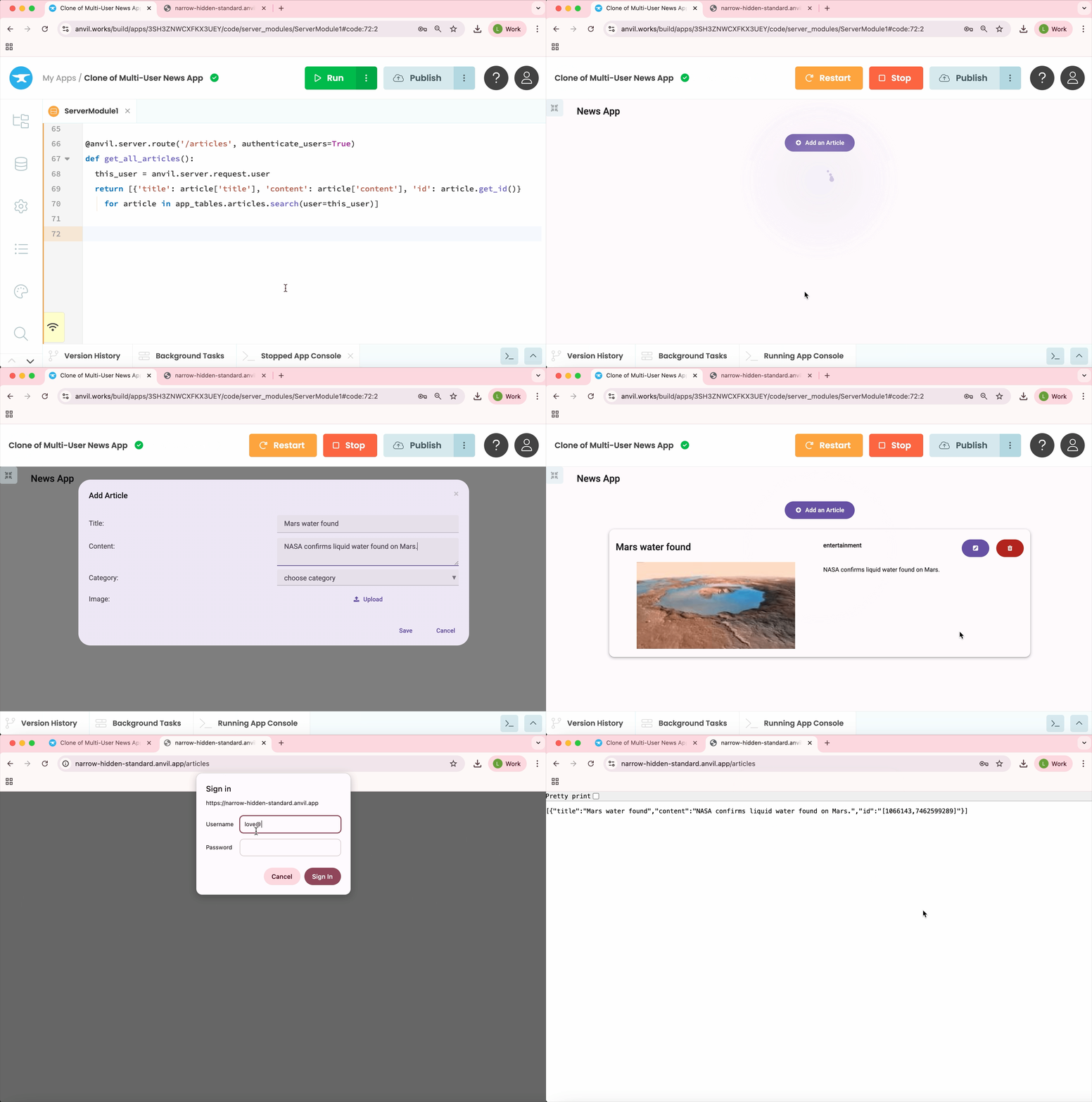
Testing the get articles endpoint
require_credentials=True instead of authenticate_users=True, then examine anvil.server.request.username and anvil.server.request.password for yourself. Learn more in our reference documentation.Step 3: Accept parameters
Now let’s add an endpoint to create a new article. We will use a POST request and accept the article title and content as Form parameters.
Form parameters are passed as keyword arguments to the endpoint function, so to make a mandatory parameter we just make our function take an argument called title and content.
Add a new function to your Server Module:
@anvil.server.route('/articles/new', methods=["POST"], authenticate_users=True)
def new_article(title, content):
  new_row = app_tables.articles.add_row(title=title, content=content,
                                       user=anvil.server.request.user)
  return {'id': new_row.get_id()}
This endpoint should only accept HTTP POST requests, so we have specified methods=["POST"]. We also return the ID of the newly-created row so the user can reference it later.
Test your endpoint with form parameters
Here is how to create a new article from curl:
$ curl -u love@anvil.works:my_password \
       -d title="Flight prices drop" \
       -d content="Airfares hit a five year low ahead of summer travel season." \
       https://my-news-app.anvil.app/articles/new

{"id":"[106143,747508081]"}
Sending JSON instead of form parameters
The example above uses form encoding. If your API users prefer to send JSON as the request body, use anvil.server.request.body_json to decode the body of the request as a JSON object.
Add another function to your Server Module:
@anvil.server.route('/articles/new_article', methods=["POST"], authenticate_users=True)
def new_json_article():
  title = anvil.server.request.body_json['title']
  content = anvil.server.request.body_json['content']
  new_row = app_tables.articles.add_row(title=title, content=content,
                                        user=anvil.server.request.user)
  return {'id': new_row.get_id()}
Test your endpoint with JSON
Here is how to use this JSON-based endpoint from curl:
$ curl -u love@anvil.works:my_password \
       -X POST \
       -H "Content-Type: application/json" \
       -d '{"title":"Flight prices drop", "content":"Airfares hit a five year low ahead of summer travel season."}' \
       https://my-news-app.anvil.app/articles/new_article

{"id":"[10613,747564]"}
Step 4: Create dynamic URLs with URL parameters
We want each article to have its own URL, so we can read, update, or delete it directly. We will use the unique ID of the database row for this and make each article available at /articles/[ID].
To do this, we make an endpoint with a URL parameter called id. URL parameters are defined with a colon prefix in the endpoint path (:id), and passed into the function as keyword arguments.
Because row IDs contain special characters that get URL-encoded, we import anvil.http and use anvil.http.url_decode() to decode the ID before passing it to get_by_id():
# Import anvil.http to decode URL-encoded row ID
import anvil.http

...

@anvil.server.route('/articles/:id', authenticate_users=True)
def article_url(id):
  # Get the current authenticated user
  this_user = anvil.server.request.user

  # Fetch the article by its decoded row ID
  article = app_tables.articles.get_by_id(anvil.http.url_decode(id))

  # Return 404 if the article does not exist or belongs to another user
  if article is None or article['user'] != this_user:
    return anvil.server.HttpResponse(status=404, body="Article not found")
  else:
    return {'title': article['title'], 'content': article['content'], 'id': id}
We check two things before returning an article: that it exists, and that it belongs to the requesting user. If either check fails, we return an HTTP 404 (“Not Found”) response. This prevents one user from accessing another user’s articles, even if they know the row ID.
Test your endpoint
Use one of the IDs returned in Step 2 or Step 3. We need to URL-encode the ID so that curl can handle the brackets correctly.
[106,4628], replace the left square bracket ([) with %5B, the right square bracket (]) with %5D, and the comma (,) between the numbers with %2C.$ curl -u love@anvil.works:my_password https://my-news-app.anvil.app/articles/%5B106%2C4628%5D
{"title":"Mars water found","content":"NASA confirms liquid water found on Mars.","id":"[106,4628]"}You could also generate the encoded URL from your terminal using Python:
python -c "import urllib.parse; print(urllib.parse.quote('[106,4628]'))"
Step 5: Handle update and delete requests
Now that we have an endpoint that fetches an individual article by its ID, we have everything we need to complete the last two operations: updating and deleting it. These are done by making PUT and DELETE requests, respectively, to the same /articles/:id URL.
Let’s update our article_url function to handle all three methods: GET, PUT and DELETE:
@anvil.server.route('/articles/:id',
                    authenticate_users=True,
                    methods=["GET","PUT","DELETE"])
def article_url(id):
  this_user = anvil.server.request.user
  article = app_tables.articles.get_by_id(anvil.http.url_decode(id))

  request = anvil.server.request

  # Return 404 if the article does not exist or belongs to another user
  if article is None or article['user'] != this_user:
    return anvil.server.HttpResponse(status=404, body="Article not found")

  # If DELETE request, delete the article and return None
  elif request.method == 'DELETE':
    article.delete()
    return None

  # If PUT request, update only the fields provided in the request body
  elif request.method =='PUT':
    if 'title' in request.body_json:
      article['title'] = request.body_json['title']
    if 'content' in request.body_json:
      article['content'] = request.body_json['content']

  # PUT and GET both fall through to here and return the article as JSON

  return {'title': article['title'], 'content': article['content'], 'id': id}
The logic is straightforward. We check the request method and handle each case. DELETE removes the row and returns None. PUT updates whichever fields were provided, then falls through to the return at the bottom along with GET and sends back the article.
Test an update
$ curl -u love@anvil.works:my_password \
       -X PUT \
       -H "Content-Type: application/json" \
       -d '{"title": "Flight prices drop further"}' \
       https://my-news-app.anvil.app/articles/%5B106143%2C747508081%5D

{"title": "Flight prices drop further", "content": "Airfares hit a five year low ahead of summer travel season.", "id": "[106143,747508081]"}
Test a delete
$ curl -u love@anvil.works:my_password \
       -X DELETE \
       https://my-news-app.anvil.app/articles/%5B106143%2C747508081%5D

null
A successful delete returns null. To confirm, we can try fetching that article again:
$ curl -u love@anvil.works:my_password \
       https://my-news-app.anvil.app/articles/%5B106143%2C747508081%5D

Article not found
We just built a fully functional, secure and authenticated REST API in about 30 lines of Python. Because Anvil is serverless, this API is already live on the internet, without us having to set up or maintain web servers.
Step 6: Advanced features
Here are a few more things you can do with Anvil’s HTTP endpoints:
Return different types of data
Aside from strings and JSON, you can also return binary data as a Media object, send a full HTTP response with custom status codes and headers, or serve your app’s client-side UI using a FormResponse object. See Returning a response for more details.
CORS
By default, Anvil sets CORS headers to permit requests from any web address where your app can be reached. To explicitly allow requests from any origin, you can pass enable_cors=True to the @anvil.server.route decorator.
XSRF protection
HTTP endpoints in Anvil are automatically protected against XSRF (Cross-Site Request Forgery). Requests from outside your app execute in an independent session, preventing malicious requests from external sites. See Security and cross-site sessions for more details.
Cookies
Anvil’s cookies are encrypted (so users cannot read cookie values) and authenticated (so users cannot tamper with them).
For the full reference, see the Anvil HTTP API docs.
Clone the App
Want to check out the finished source code? Clone the app below:
More about Anvil
If you’re new here, welcome! Anvil is a platform for building full-stack web apps with nothing but Python. No need to wrestle with JS, HTML, CSS, Python, SQL and all their frameworks – just build it all in Python.
Learn More
Get Started with Anvil
Nothing but Python required!
A fully-featured customer service ticketing system
Build a Web App with Pandas

A Guide to Styling Apps with CSS
Building an Online Store using Python