

Containers
Some components can contain other components. We call these containers, and they all inherit from the Container class. (All Forms are also containers.)
For a full list of container components, see Components: Containers.
You can add a component to a container in Python by calling the container’s add_component() method.
btn = Button()

self.linear_panel_1.add_component(btn)
You can call a container’s get_components() method to get a list of all the components that have been added to it.
Parents and children
You can look up a component’s container with the .parent attribute. If a component has not yet been added to a container, its .parent attribute is None.
print(btn.parent)
# prints "<anvil.XYPanel object>" for a button inside an XY Panel
Try to avoid using multiple .parent attributes chained together to go up the component hierarchy.
You will probably find your code is more robust if you use get_open_form() to get a reference to the
currently-open Form and find the component you’re looking for from there.
Removing components
To remove a component from a container, call the component’s remove_from_parent() method.
btn.remove_from_parent()To remove all components from a container, call the container’s clear() method.
self.xy_panel_1.clear()Raising an event on all children
To raise an event on all components in a container, call the raise_event_on_children method
container.raise_event_on_children(event_name, extra_args)This takes exactly the same parameters as component.raise_event, and is subject to the same constraints on event names.
It is especially useful when you want to signal to all children of a RepeatingPanel without already having explicit references to those children.
Container Properties
Container Properties are properties that control the relationship between a component and the container it is in; the argument names and their meanings depend on the type of container. They are visible in the Properties Panel in the Anvil Editor. They can also be passed as keyword arguments to add_component.
For example, components added to XYPanels have x, y, and width properties, which determine the position of the component. You can specify them in the designer:
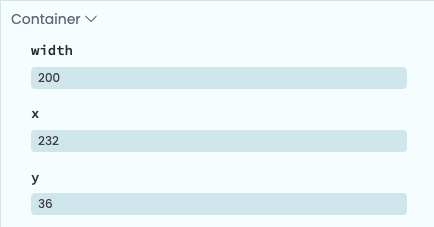
Container properties are at the bottom of the
Properties Panel
Or you can pass them as keyword arguments when you call add_component() in your code:
btn = Button(text="Click me")
self.xy_panel_1.add_component(btn, x=100, y=100)
For more information on the container properties available for each container type, consult the Anvil API Reference.
Do you still have questions?
Our Community Forum is full of helpful information and Anvil experts.