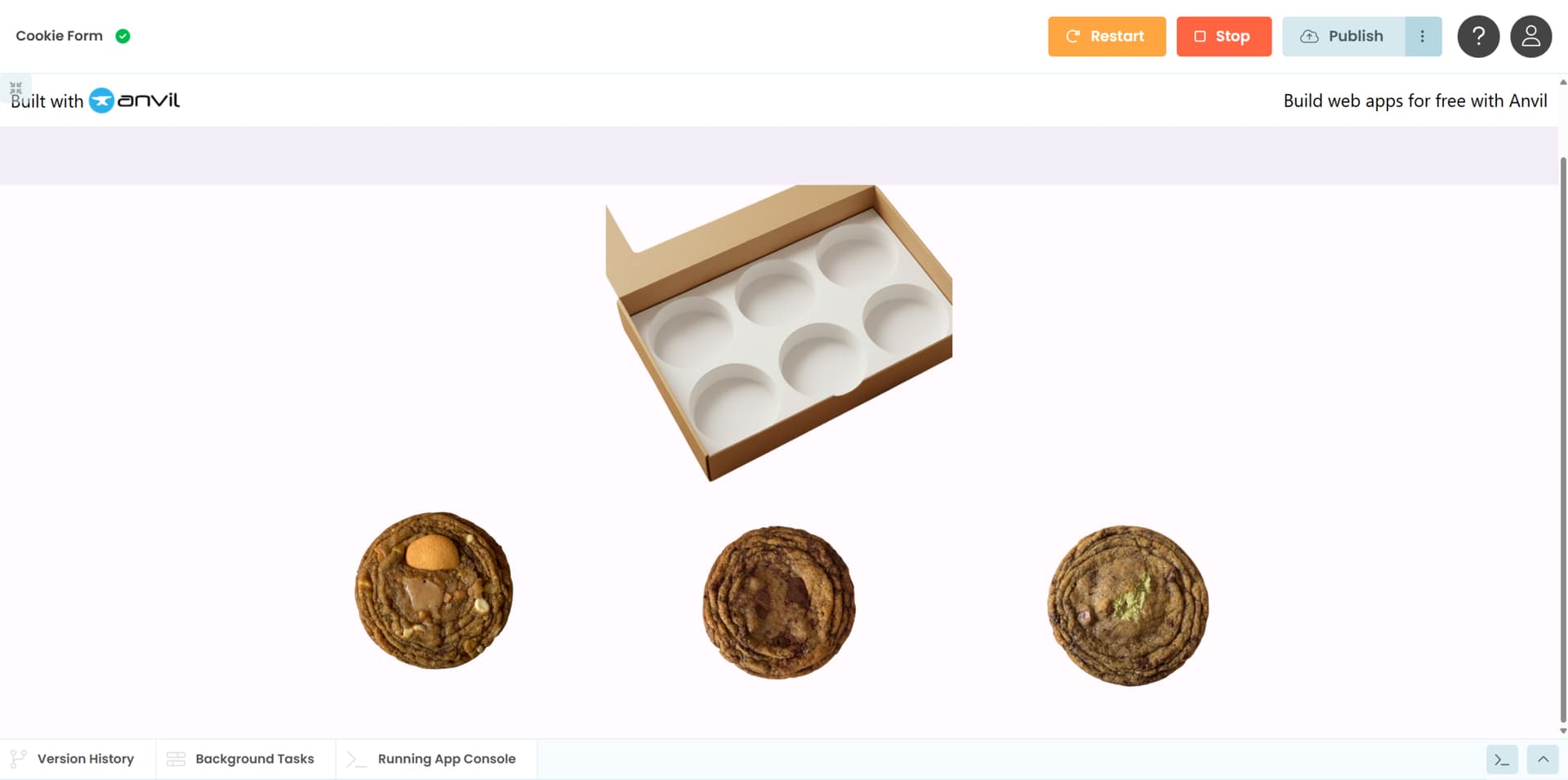
What I’m trying to do:
I want to create a form for a cookie website. I have a list of cookie images, and I want to click and add them to a image (of a box) and I want the cookies to appear inside of the box.
I believe it’s more of a UI issue and how things work in anvil. I literally don’t even know how to get started. I wonder if there is a tutorial or something I can follow?
Clone link:
share a copy of your app
I have never done this, but here is the process I would go through:
- Make sure there’s an image where 1-6 (or however many) cookies are in the box and then however many less cookies are then taken away from the outside (so I assume 7 different image files for the box state). Maybe someone knows the way to overlay images so they look right, but that’s not me, so I would just make the extra images.
- You would then make a event handler for the
mouse_up event on the image component and use that to change the image source to the next image in the numerical list.
3. Then to Transition from one image to another smoothly you would use CSS animations (if step 2 isn’t smooth enough already, but that might be overengineering) : Using CSS animations - CSS | MDN
I would explore the canvas, you can insert an image in a canvas.
You could create a function that takes a list of image names and positions, and inserts every image in its position.
I think making a proof of concept will be easy and quick, getting it to work on different sizes and devices may be a little tricky.
2 Likes
Adding to @stefano.menci’s suggestions:
Since the cookie images are distinct, you will probably want a second image of each cookie, from an oblique angle, as if it was already sitting in the cookie box.
With a canvas, you can place any image anywhere, and even stack them back to front. (This is the default.)
With these tools, then, you can put [the image of] the box on the canvas, and then overlay [the image of] any cookie at your chosen location(s), making it appear as if it is in the box.
1 Like
Is there a tutorial or docs I can focus on that shows me how to do this? @stefano.menci
So, I went through the docs for anvil and found some resources. The part that I am getting stuck at is the box doesn’t show up in the canvas when the form loads.
I might be able to get it to appear where I need it to appear. It seems to put the “cookie” on the canvas as intended.
from ._anvil_designer import Form1Template
from anvil import *
import anvil.tables as tables
import anvil.tables.query as q
from anvil.tables import app_tables
import anvil

class Form1(Form1Template):
  def __init__(self, **properties):
    # Set Form properties and Data Bindings.
    self.init_components(**properties)


    # Any code you write here will run before the form opens.

  def form_show(self, **event_args):
    box_image = anvil.URLMedia("_/theme/box2.png")
    self.canvas_1.clear()
    self.canvas_1.draw_image(box_image, 0, 0, 500, 500)


  def image_1_mouse_up(self, x, y, button, **event_args):
    """This method is called when a mouse button is released on this component"""
    c = self.canvas_1
    img1 = self.image_1.source
    c.draw_image(img1,25,25,100,100)
    pass
You might want to run through the Canvas tutorial for some best practices: Anvil | The Canvas Component
2 Likes