Internal server errors

Hi,

i get these errors too, example:

anvil.server.InternalError: Internal server error: 3c4b9e4d059e

  • at /home/anvil/downlink/anvil/_threaded_server.py:518
  • called from /home/anvil/downlink/anvil/_server.py:46
  • called from /home/anvil/downlink/anvil/_server.py:86

The errors appear when i add (or at least try to add) values to a multiple link column.

I understood the sentence to mean that you receive an internal message when an internal error occurs somewhere. I must have misunderstood, because nothing has happened so far.

So it would be nice if someone could take care of the error. It is extremely annoying when I cannot continue working because of an error that I cannot fix myself.

Hello @de_maggus,
I have moved this to a new thread since it’s best not to revive old ones. Could you share the code that is causing these errors, to help us investigate further?

Hi,

I have a form that contains a data grid, among other things. To select the items I want to assign, I open another form:

  @handle("link_add_hardware", "click")
  def link_add_hardware_click(self, **event_args):
    
    list_hardware = []
    
    editing_form = Select_Hardware("", "")
    list_hardware = alert(content=editing_form, title="Select Hardware", large=True, buttons=[])

    if len(list_hardware) > 0:
      anvil.server.call('add_hardware_to_processing_activity', self.uid, list_hardware)

In the form is a datagrid with the items. The first column contains a checkbox to select items:

@handle("checkbox_select", "change")
  def checkbox_select_change(self, **event_args):
    if self.checkbox_select.checked:
      self.parent.raise_event('x-add-hardware', hardware=self.item)
    else:
      self.parent.raise_event('x-remove-hardware', hardware=self.item)

The code to add the selected item to the list of selected items:

def __init__(...)
    self.repeating_panel_1.add_event_handler('x-add-hardware', self.add_hardware)
...
def add_hardware(self, hardware, **event_args):
    self.list_hardware.append(hardware)

Then i click on Ok:

  @handle("button_ok", "click")
  def button_ok_click(self, **event_args):
    self.raise_event('x-close-alert', value=self.list_hardware)

The code to add the items in the servermodule:

@anvil.server.callable
def add_hardware_to_processing_activity(uid, items_hardware):
  pa = app_tables.dp_processing_activities.get(uid=uid)
  print("PA: " + pa['name'])
  if pa['hardware'] is not None:
    pa['hardware'] += [items_hardware] 
  else:
    pa['hardware'] = [items_hardware] 

The error message is:

anvil.server.InternalError: Internal server error: 454f056ce1e5

    at /home/anvil/downlink/anvil/_threaded_server.py:518
    called from /home/anvil/downlink/anvil/_server.py:46
    called from /home/anvil/downlink/anvil/_server.py:86
    called from ServerModule1, line 156
    called from /home/anvil/downlink/anvil/_threaded_server.py:191
    called from DataProtection.Edit_Processing_Activity, line 59

I hope it is understandable. If you need further information please tell me.
Hi,

the error is still there and there has been no response from you, not even a brief status update to let me know whether you are dealing with it at all.

Hi de_maggus,

Are these existing functions that have been working for months but have only started throwing these errors?

We’ve got a number of applications that have been running fine for the last few months, but we’ve seen an increase in Internal Server Errors in the last few days.

Hi jay.austin,

no, I’ve only just started working with Anvil, so it’s not a productive system. I can’t rule out 100% that it’s a mistake on my part. However, since the official line is that internal error messages have deeper causes, I assume that it’s not my fault.

However, if, as in your case, this can also occur in a productive system and there is no response at all from the official side, it seems to me that Anvil is unsuitable for professional use. There does not appear to be any technical support available. This does not inspire confidence.

Hi @de_maggus,

Can you let me know if these errors are still occurring? If so, can you send me the app ID so I can take a look?

The app ID can be found in your app’s general settings.

Hi,

the errors are still occuring. I sent you the app id per message.

Hi @de_maggus,

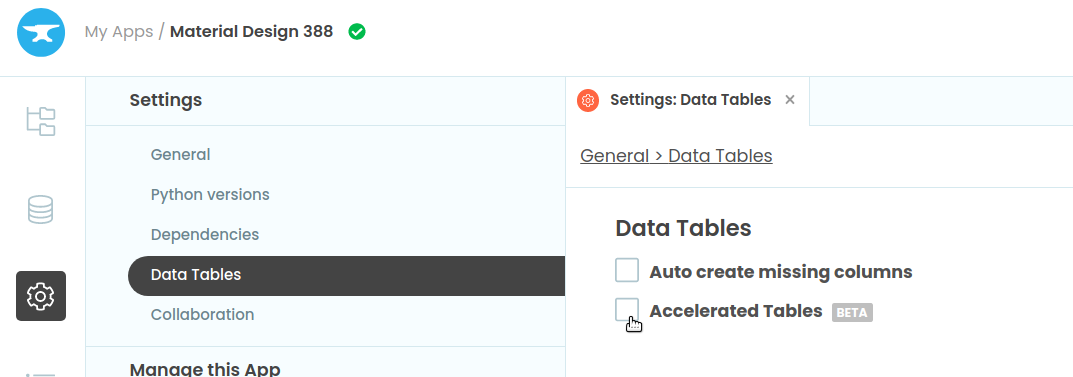
We can’t immediately see a cause for this, but can you try switching on Accelerated Tables? That should fix the issues, but if it doesn’t, then we can investigate further.

Hi,

i activated accelerated tables, but now i get the following error:

anvil.server.InternalError: Invalid capability

  • at /home/anvil/downlink/anvil/_threaded_server.py:518
  • called from /home/anvil/downlink/anvil/server.py:68
  • called from /home/anvil/downlink/anvil/tables/v2/_batcher.py:120
  • called from /home/anvil/downlink/anvil/tables/v2/_row.py:1037
  • called from /home/anvil/downlink/anvil/tables/v2/_row.py:903
  • called from /home/anvil/downlink/anvil/tables/v2/_row.py:711

Does this happen every time or is it intermittent?

it happens every time.

Well that’s unfortunate… Can you turn off Accelerated Tables then, and tell us how to reproduce the Internal Server Errors so we can trigger it ourselves? You can DM the reproduction steps if you don’t want to make them public.

Hi,
i sent you a link to a pdf with the steps to reproduce the error.

1 Like

Hi @de_maggus,

I apologize for the error message being less than helpful, but we’ve figured out what was causing it. In the code you’ve provided above, you have these lines:

  if pa['hardware'] is not None:
    pa['hardware'] += [items_hardware] 
  else:
    pa['hardware'] = [items_hardware] 

items_hardware is already a list, so when you do [items_hardware], you are making a list of one item which is another list. The Data Table row is expecting to unpack a list and assign each item inside to the appropriate column of the linked Data Table. Instead, it tries to unpack the list, finds a list inside and subsequently blows up!

There are a few other points in your code with the same issue, so you’ll need to remove those square brackets from all of those instances.

I hope that makes sense! We will work on improving the error message so that you don’t just see an internal server error.

hi @brooke,

thank you very much, now it works :slight_smile:

As I wrote at the beginning, I am still new to Anvil and obviously misunderstood the instructions (Anvil Docs | Links Between Tables).

Your explanation makes perfect sense to me. When I make mistakes in other areas, the error messages always help me, but not in this case.

Greetings, Markus

1 Like