Hi!
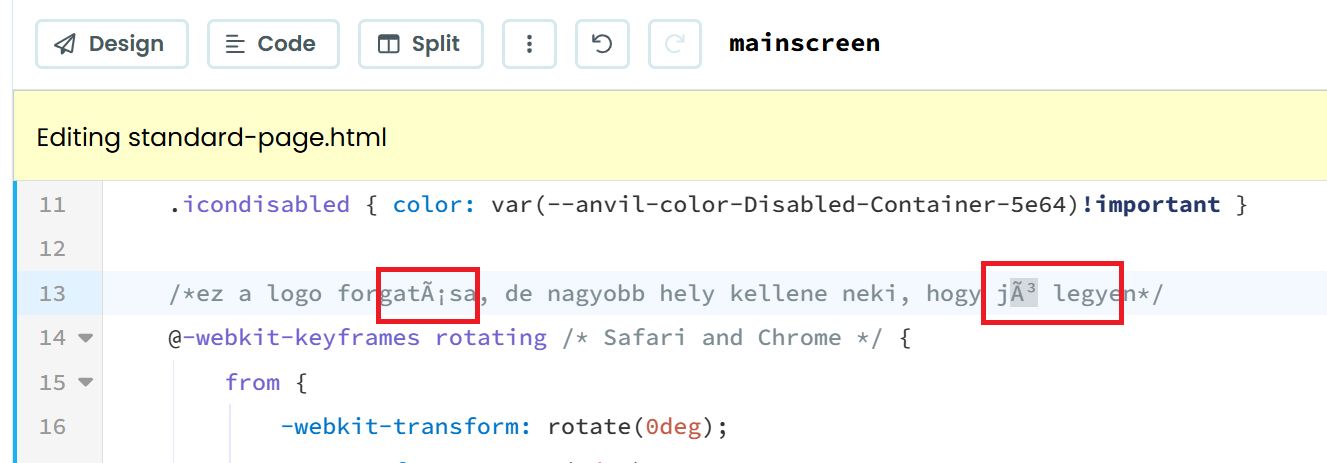
I made code comments in standard-page.html in the editor and these are garbled when I opened it again using special (Hungarian) characters like áéí.
I checked the Python editor. That works fine in this.
Could you remedy this?
To save standard-page.html (or any other files normally added) as Unicode not as Ascii or similar (I can’t see the exact code page for the file)?
George
All other files may not also be encoded either. E.g. CCS files uploaded to assests.
do you have steps to reproduce?
I just tried and couldn’t reproduce
- created a new app
- opened standard-page.html
- added a comment block
<!-- áéí -->
- waited for the save and refreshed the page
Hi!
Thx for reply.
I not long ago experienced the same with other files uploaded.
I attached one file for example: https://kdrive.infomaniak.com/app/share/1560338/36ffb33f-3ad1-492d-b28e-779247d6078e.
I zipped the file to ensure that encoding is kept.
Or if you want to login to my machine, I can give you remote access to a machine and you can inspect it as long as you want it.
Just let me know.
George
I realized this: this file was NOT utf8 encoded and the error was due to that.
And probably the other files were not encoded either.
Well, I double checked it and it was utf8 encoded. (I checked it in VSCode too because my text editor, BowPad was incorrect about it when I opened it.)
ok thanks i’ll see if i can reproduce doing a file upload rather than a file edit
Edit: yes that did it (moved to bug reports)
1 Like
Thx!
(I wanted to tell, but it can’t be added as a replay since there is a 20 chars min. limit to a message, incorrectly. Since such short messages are key part of communication.)
1 Like