Faster Storage: Data Tables, but much faster

Faster Data Tables are here

We have just released a new storage engine for Data Tables, and it is multiple orders of magnitude faster than our original storage engine. It’s the same API, just faster. You can switch it on right now and start creating Faster Storage tables, or migrate your existing apps.

There’s more: Faster Storage also gives you full control over indexing (on Business plans and up), so you can optimise for queries and orderings on particular columns or combinations of columns. You can also control what happens if you delete a row that’s linked to by another row – set the link to None, raise an error, or even automatically delete the linking rows.

Check out the blog post, or scroll down for some indulgent backstory:

Let me tell you a story…

When we first built Anvil, we built Data Tables on top of Postgres. (Good choice, as it turns out.) However, knowing that we were going to be serving a large number of tables with wildly varying schemas, we went no-SQL: We combined lots of Data Tables into big shared Postgres tables, storing different-shaped data in one multi-purpose column by JSON-encoding it using Postgres’s efficient JSONB storage. We then indexed the whole thing with GIN (Postgres’s Generalised Inverted Index), so that you could quickly look up any column by any value with no prior developer configuration.

This unlocked a bunch of very cool functionality, but at scale it turned out to have some significant disadvantages. The average case continued to be fast, but our tail latencies weren’t great, and they got worse as Anvil grew.

Some of the failure modes were obvious in retrospect. One developer discovered that we weren’t enforcing storage size limits for SimpleObjects. To avoid upgrading their account, they instead started combining lots of records into one SimpleObject, stuffing dozens of megabytes into each row. Every time they updated one tiny record, they rewrote one of these enormous rows – this wasn’t a low-traffic app, so these updates were frequent – and because we were indexing absolutely everything, each update effectively wrote a full copy of the affected row into the index. We saw peaks of gigabytes per minute on a single table.

Fun fact: If a GIN index is receiving too much data, Postgres will victimise the next process that writes to that table, and force it to organise the index before it’s allowed to carry on with its work. Because this was a shared table, this problem first showed up as other apps’ Data Tables updates taking absurdly long times to write tiny updates, or just timing out. That was fun to debug. (We count SimpleObjects against data limits now.)

But the other issues were much harder to pin down. Postgres has some great query-analysis tools – you can run a query with EXPLAIN ANALYZE and get full details of its runtime, how much IO it did, and so on. Unfortunately, whenever we pulled a slow query from the logs, it would be fast! Performance was critically dependent on cache state in puzzling ways. With patient sampling, we identified inefficient filtering patterns, optimised our queries, and tuned Postgres settings, but the P99 latencies stayed stubbornly high.

It gradually became clear that this was a losing battle. We were using Postgres in a way it wasn’t designed to be used, we were piling workarounds on workarounds, and Data Tables performance was still a running complaint. The breaking point was a rapidly growing customer who could not continue as-is: They had their entire working dataset in RAM and their Data Tables still could not perform acceptably.

So we buckled down, and at the end of last year we started to rewrite our storage engine. This engine is in some sense much more straightforward: One Data Table = One Postgres table. Of course, this means a lot of things we’d been trying to avoid: Automating a bunch of nasty Postgres DDL, making sure our own representations were always in sync with the database, and making sure the new system satisfied the same API contracts as the old.

We’ve been trialling Faster Storage with selected customers for the last few months. The new engine has been battle-tested with production load, and the reaction has been extremely positive. When we first switched over one of our internal apps, there were audible gasps in the office when people saw how much faster it got.

So, that’s the story of Faster Storage. I hope you enjoy checking it out, migrating your apps, and enjoying that sweet, sweet performance!

6 Likes

Amazing news, and exactly what I needed! Thanks a lot.

Also enjoy these posts about how it works underneath. Explains a lot of
things I’ve wondered about without ever asking.

My favourite kind of optimisations are the ones where you flip a switch and see your app faster magically!

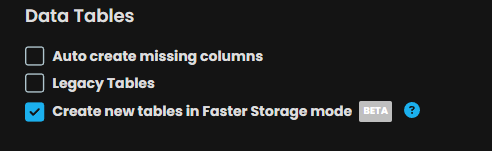
However, I can’t seem to test our Faster Storage. I enabled the check for Faster Storage and then cloned my app.

image

But I still get this on the cloned app
image

I am on Hobby Plan

A post was merged into an existing topic: Faster Storage teething issues

Thanks for letting us know about these issues!

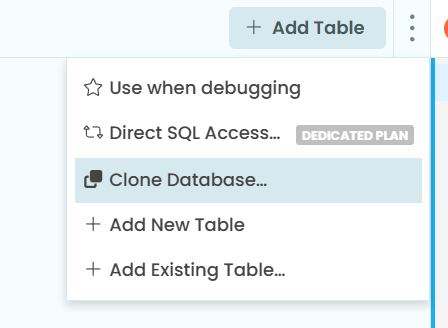
@divyeshlakhotia When you clone your app, the tables are copied exactly as they are, in whatever storage mode they are currently in. To try out Faster Storage, you’ll want to clone the Database within your app: Tick the Faster Storage box, as you have done, then clone the database:

image

@Neeeco As you’re on the old Dedicated Plan, I think the issues here are related to your particular setup, and I’ll need some more information to track them down. Please can you tell me which app/DB you’re attempting to clone so I can investigate further? Feel free to DM the details if you would prefer.

I think that requires the Business Plan?

The docs say
image

Having been involved in some of the trial, all I can say is - Good Grief, this makes a difference!!

1 Like

@divyeshlakhotia - ah, that was an old molly-guard to make sure this stuff didn’t escape containment if we gave out a clone link. Now updated so that if you make a clone of an app with Faster Storage enabled, you get Faster Storage in the clone!

@owen.campbell – Glad to hear that! You’ve been on the front lines here, and we appreciate your help testing this out.

1 Like

@meredydd that was a very interesting story. Always cool to get an inside look.

Congratulations on the release!

1 Like

I can’t help but feel a little angry that I wasted weeks of my life on over-optimizing storage I/O. But on some level, I know that’s not fair and I’m grateful for this service overall and for this transparency. (And I’m getting excited about seeing what we can build now.)

2 Likes

I get it. For internal use, I’ve slowly been building a SQL-inspired data-integrity layer over Anvil’s API. It’s schema-based, with old-style foreign keys and actual Domains (value-restricted data types).

The idea was to

  1. reduce Garbage-In-Garbage-Out syndrome, and to
  2. make it easier to migrate to an actual SQL database that has in-database constraints and triggers to enforce data sanity, should that ever be necessary.

But with actual SQL tables underneath, it should eventually be possible to expose such enforcement tools, within Anvil. (We’re seeing that already with link-valued columns.)

By factoring the enforcement out into the database, it would remove much of that code from each of the Apps that needs to write it.

1 Like

Are Meredydd and Ian talking about the same thing here?

My understanding is that Ian was describing the previous behavior: enabling Faster Storage and cloning the app wasn’t enough to migrate the existing tables. You had to clone the database.

Then Meredydd is saying that this has just changed, and now enabling Faster Storage and cloning the app will recreate the tables using Faster Storage.

Is that correct?

That brings me to my real question: how to migrate an existing setup with lots of shared tables.

I have dozens of apps sharing the same Users table, one large Log table, and a few other commonly used tables.

The Log table is mainly used by my Logger app. It’s a centralized logger used by all my Anvil apps, Excel macros, CAD/CAM plugins, etc. I go there to see what’s happening when multiple tools are talking to each other (or not). Every night it gets trimmed back to the latest 200,000 rows.

My understanding is that the migration would look something like this:

First, pick one app, probably one with an high number of shared tables, and clone its database with Faster Storage enabled. That gives me Faster Storage versions of Users , Log , and the other tables. I can then delete that app’s old database; the tables that are still shared by other apps should remain until those apps stop using them.

Then I see two strategies:

  • For apps that only have a few small local tables, leave those tables alone, remove the old Users, Log and other shared tables, and add the new Faster Storage versions as shared tables.
  • For apps with large or performance-sensitive local tables, clone the whole database so those tables are migrated too. That also means cloning Users , Log , and the other shared tables again, waiting several minutes for Log , then deleting those unnecessary copies and adding the shared Faster Storage versions back.

Is that basically the recommended migration process, or am I missing an easier way?

A few related questions:

  1. Is there a better way to migrate a table that is shared by dozens of apps?
  2. Is there a better way to migrate a large table like Log , or does it really need to be fully copied during the migration?
  3. What happens to direct SQL queries? I have queries that refer to tables using relation names such as table_123 . Will those names stay the same after migration?
  4. Any advice from Anvil staff or beta testers about indexes when migrating existing apps? Most of mine have been running with the default/automatic indexes, including some that are probably never used. Should I review queries and indexes as part of the migration, or migrate first and add indexes only where they turn out to be useful?

This also reminds me of something I’ve wished app cloning could do for a long time.

When cloning an app, I’d love to have one choice per table:

  • create a new empty table
  • clone the table including its contents
  • keep sharing the existing table, if the clone is in the same account

Right now every time I clone one of my apps, I wait several minutes for that large Log table to be cloned, only to immediately delete the copy and add the shared Log table back.

1 Like

Correct! Contrary to much speculation (and many jokes at both our weddings), we are in fact two separate people and not a hivemind. However, the current and correct state is: If you enable Faster Storage and clone your app, the clone’s tables will use Faster Storage.

As for the bulk of your question, it’s such a good one I’m about to go answer it in its own thread!

Edit: here it is!

1 Like