What I’m trying to do:
I am trying to pull data from an external database (that portion appears to be working) and load that data into a data_grid.
The data I have retieved from the database is in this form:
[{'ID':1, 'Email Address':'joe@team.com', 'Record Type':'Team Captain', 'First Name':'Joe', 'Last Name':'Captain', 'Cell Phone':'3101231234'},{'ID':3, 'Email Address':'sally@team.com', 'Record Type':'Block Captain', 'First Name':'Sally', 'Last Name':'Captain', 'Cell Phone':'3101231235'},{'ID':37, 'Email Address':'roger@team.com', 'Record Type':'Block Captain', 'First Name':'Roger', 'Last Name':'Captain', 'Cell Phone':'3101231236'}]
Based on instruction I have seen elsewhere
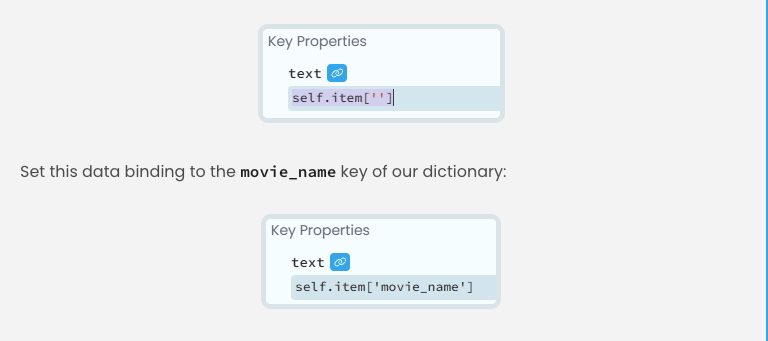
I should:
- Double click a row in the repeating panel to bring RowTemplate1 to the front
- Add labels on the row for each column
- Set the Key Properties for each column to the key value for each data element - all of which have been set

My form1 code is:
from ._anvil_designer import Form1Template
from anvil import *
import anvil.server


class Form1(Form1Template):
  def __init__(self, **properties):
    # Set Form properties and Data Bindings.
    self.init_components(**properties)

    # Any code you write here will run before the form opens.
    # Retrieve the data from the database
    self.repeating_panel_1.items = anvil.server.call('get_filtered_names')

# DISREGARD THIS FUNCTION
def button_1_click(self, **event_args):
    output = anvil.server.call('get_db_row')
    self.text_box_1.text = output

def button_2_click(self, **event_args):
    print('//')
    print(self.repeating_panel_1.items)
    self.repeating_panel_1.items = self.data
My server code is:
import anvil.server
from baserowapi import Baserow, Table, Filter

# This is a server module. It runs on the Anvil server,
# rather than in the user's browser.
#
# To allow anvil.server.call() to call functions here, we mark
# them with @anvil.server.callable.
# Here is an example - you can replace it with your own:

# Replace with your Baserow instance URL and API token
BASEROW_URL = "https://api.baserow.io/"
API_TOKEN = "<API Token Is Here>"

# Initialize Baserow client
baserow = Baserow(BASEROW_URL, API_TOKEN)

#table = Table(client=baserow, table_id=table_id)
table = baserow.get_table(760123)

# DISREGARD THIS FUNCTION
@anvil.server.callable
def print_message():
  message = "this is the message"
  return message


# DISREGARD THIS FUNCTION
@anvil.server.callable
def get_db_row():
  # Fetch a row using its ID
  my_row = table.get_row(1)
  return my_row['Full Name']

@anvil.server.callable
def get_filtered_names():
  the_rows = table.get_rows(filters=[Filter('Last Name', 'Captain')])
  # Build the Transfer variable

  transfer = '['

  # Cycle through rows and add them to the Transfer variable
  for my_row in the_rows:
   transfer += f"{{'ID':{my_row['ID']}, 'Email Address':'{my_row['Email Address']}', 'Record Type':'{my_row['Record Type']}', 'First Name':'{my_row['First Name']}', 'Last Name':'{my_row['Last Name']}', 'Cell Phone':'{my_row['Cell Phone']}'}},"

  transfer = transfer[:-1]
  transfer += ']'
  print(transfer)
  return transfer
My code in ItemTemplate1, RowTemplate1 and RowTemplate2 are all default. No additional code added.
What I’ve tried and what’s not working:
When I try to run the app, my display is blank. I get six error messages regarding the data bindings
Blockquote
Exception: Data Binding update failed with 6 errors. Did you initialise all data binding sources before initialising this component?
-
Error binding
textoflabel_1toself.item['ID']:
string indices must be integers, not str -
Error binding
textoflabel_2toself.item['Email Address']:
string indices must be integers, not str -
Error binding
textoflabel_3toself.item['Record Type']:
string indices must be integers, not str -
Error binding
textoflabel_4toself.item['First Name']:
string indices must be integers, not str -
Error binding
textoflabel_5toself.item['Last Name']:
string indices must be integers, not str -
Error binding
textoflabel_6toself.item['Cell Phone']:
string indices must be integers, not str -
at Form1.RowTemplate1, line 9 -
called from Form1, line 13
Any assistance getting this data to load into the data grid would be greatly appreciated.
Clone link:
share a copy of your app