I have several company logos of different sizes, backgrounds, and texts, all stored in the Assets of one app. My other apps use these logos with URLs like <img src="https://my-app-name.anvil.app/_/theme/logo_corp_dark.png"> or in the app settings with https://my-app-name.anvil.app/_/theme/favicon-32x32.ico.
Today, I opened that app and was surprised to find that the bitmaps were missing from the bottom of the app tree. To test, I added a new bitmap, and that one did appear. Here’s what I see:
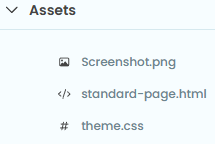
However, when I tried accessing the new image via https://my-app-name.anvil.app/_/theme/Screenshot.png, it didn’t work.
Summary:
- I expected to see the old images under
Assets, but they weren’t there. - I expected the newly added image to work with the same URL format as the old ones, but it didn’t.
Has something changed in the way assets are managed, or is my memory failing me?