Hi!
I am creating this topic since I can’t find a solution for my situation and I am sure is quite common. I have some things working, but I am sure there is a better way to have it done and some advice or tips would be useful to the whole community.
My situation is related with 2 tables relationships, the general questions is: having 2 tables that are related what are the best practices to have a update, edit, show and delete operations on them?
I have one table called “Problems” and another called “Solutions”. Solutions can have more than one record for each problem.
1- I want to see the list of “Problems” and its related “Solutions”
2- I want to add a “Solutions” entry to a given “Problem” while seeing the other proposed “Solutions”
3- I want to delete a “Solution”
4 - I want to edit a “Solution”
What I think I am missing is a way to reference the actual row on a Repeating Panel so I can pass it to a search by ID.
Would be great to have a component to deal with this 2 table relationships 
Thanks!
M.
Hi there,
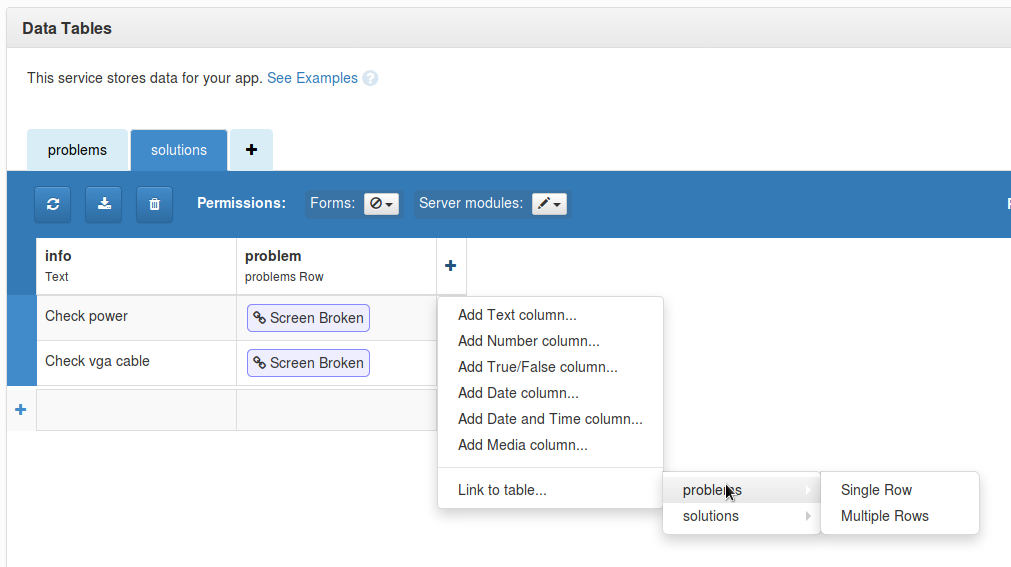
One way is to create a link between your “problems” table and your “solutions” table. I would create a column in your solutions table which is a link to a single entry in your problems table :
– NOTE I have done client side data lookups for simplicity. in reality you should always push table access onto the server and return the results. –
You can reference the solutions for any given problem like this (this is greatly simplified) :
# WARNING - untested code with no error checking!

# Fetch first problem
prob = app_tables.problems.search()[0]
# Find all solutions related to this problem.
for sol in app_tables.solutions.search(problem = prob):
    print(sol['info'])
In your case, you would store the problem object in the repeatingpanel form instance and use that as the search criteria for the solutions table.
Here’s a simple example :
On running, click the button to show a list of problems in a repeating panel.
Click the more button to show the solutions so far (just printed to the debug window for now).
I pass the whole problem object to the repeating panel (each line item will have a problem object in “self.item”).
Does that help any?
Also, I recommend the ToDo tutorials (both of them) as the masters themselves demonstrate these techniques far better than I do : Anvil | Tutorials
Hi!
thank you for your answer.
I was aware of the table links, but unfortunately I can’t have it working…so I was wondering that there must be a “recommended” way to do it, it is taking me so long for something that very common. But I guess there is no other way.
I really think a “nested” repeated with insert and delete capabilities is needed here
Thanks!
M.
Hi there,
Your question was such a good example of the sorts of things you might do with Anvil, that I’ve built it out into a full example. Here it is, take a copy:
https://anvil.works/ide#clone:MWTFWXM4DADIN5DC=XIKHRSYNXKWNN5FZGQ46NIIH
Notes:
-
“Link” columns in Anvil data tables don’t give you the ID of the row they refer to - they give you the object itself. Take a look at the SolutionDetails form for an example: To get the name of the associated problem, we just bind the label to self.item['problem']['name']. (self.item['problem'] gets us the row from the Problems table, so we can just look up its name column directly)
-
This app demonstrates a common pattern - a “List” form, with a RepeatingPanel, which you can click to open a “details” form.
-
There are two versions of the “edit solution” functionality:
-
The simple one passes in the database row as the item for the SolutionDetails form. This means that all edits are reflected in the database instantly.
-
The “buffered” one provides “Save/Cancel” functionality: we make a dict from the database row, and use that as the item for the SolutionDetails form. (Database rows are accessed the same as dicts, so all the data bindings still work!) We only update the database row if the user clicked “Save”.
-
When you create a new solution, we re-use the SolutionDetails form to create the new solution. We give it a dict with the 'problem' key set to the appropriate row from the Problems table. When that dict gets passed into anvil.tables.add_row(), it links the problem column of the new row to the correct row in the solutions table. This is the same principle discussed in this example.
-
None of the data tables in this example are accessible to Form (client) code. They are all guarded by server modules. Right now, that doesn’t provide much protection - the server modules give out access to anyone who asks. However, you could easily combine this with user authentication to only allow authorised users to edit this data.
I hope that helps, and gives you a sense of the sort of patterns we use to create “CRUD” apps with Anvil!
6 Likes