I finally converted my client code to Python 3 today, which required converting to the “Packages” structure. I was expecting the directory structure of the git repo to change, but it didn’t. The file structure seems to be the same. For instance, there is not a separate directory for each form.
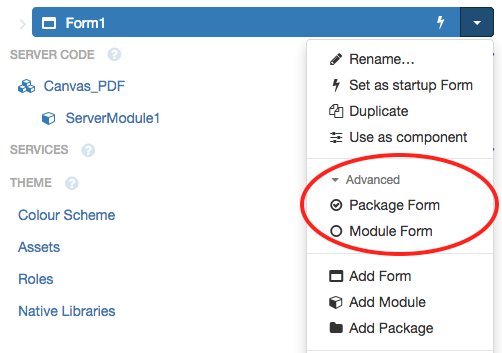
I see now that in the “Advanced settings” in the dropdown for each form in the Anvil IDE, there is a toggle between “Package form” and “Module form.” I’m guessing that mine are “Module forms” for backwards compatibility purposes, but that a “Package form” has the new directory structure? That makes sense but I just don’t think I’ve seen this explained in documentation.
All I’m really looking for, I guess, is reassurance that I’m not doing something wrong, that I should be good to go, going forward.
Don’t worry, you’re not doing anything wrong. When you first convert an app, Forms are indeed ‘Module Forms’ for backward compatibility. This allows you to convert your app without rewriting any import statements.
You can convert your pre-existing Forms to be Package Forms as and when you wish. In fact, all Anvil apps let you switch any Form between Module and Package mode at any time - but it’s squirrelled away behind an ‘advanced’ menu because it’s only really used for converting legacy Forms.
Here’s a guide to migrating your apps to use Packages:
I now see that the “converting to packages” guide is right after the “converting to Python 3 client-side” guide, but a link inside the text of the latter may have helped me find it easier. When I instead clicked on a “Packages” link inside the latter guide, it took me to a different section of the docs.