Opening a new form for a specific item from a repeating panel - record ID?

I’m making an app that has some basic CRUD functions. I have a form that has a repeating panel of all the items from a table, but it shows only a subset of the available fields. I want to have a clickable button on the repeating panel that opens a new detail form for the record clicked.
The way I was headed was to have the name field in the repeating panel as a clickable link that would open the new form, but I need to populate the new form with the record that was clicked. Is there a record ID or something similar to refer to to make sure the correct item is opened?
To make the example more concrete - it is a CRM-style app, so I have a list of companies showing just the name and a brief description. I want to be able to click on a company in the list and open a record for that company with lots more detail. It is unlikely but possible that there would be two entries with the same name, so I do not want to depend on any user-entered field as being unique.

Thanks,
Philip

Is the extra detail part of the same table or in a separate, linked table?

If it’s part of the same table …
when you provide the company list to the company repeating panel (I assume as a result of a search) , pass the whole result to the repeating panel. Inside this you can cherry pick the data to display in your list and, as you suggest, using a link you can then pass the whole lot to the new (popup?) form to pick out the details.

Even if it’s a linked table the same applies. You can pick off the linked field and under that will be all the linked detail data. Same process.

Remember that each line item is self contained and will represent one record.

Does that make sense? I’m not at my best today, writing wise :slight_smile:

Let me know how your data is set up and I’ll drill that down a bit if you need me to.

I’m a rookie with Anvil, so my question may be super simple. But yes, you are describing the circumstance I am trying to create (all the data are in one table, but only a few of the fields are shown in my list form; I then want to open a more form that has just the record that was clicked but shows all the field). The place I have gotten stuck is simply passing the current record to a new form.

Let’s suppose there is a form called “CompanyList” with a repeating panel that selects all the items from the Company table but only shows the name and description. I have a separate form “CompanyDetail” that shows all the fields from the “Companies” data table. On the repeating panel, I put a button, and I just want that button to open the CompanyDetail form for the record on which it appears. I tried the following code in the repeating panel:

from CompanyDetail import CompanyDetail
detail = CompanyDetail(self.item)
open_form(detail)

but there is an error in the middle line that says I am passing 2 args to init which only takes one

Thanks,
Philip

Regarding passing the parameter, make sure the init function has the extra parameter defined. For example, in the form you are calling :

# Change this - 
def __init__(self, **properties):

# into this -
def __init__(self, item, **properties):

That should get rid of your error and you can use “item” in your new form.

Thanks - I just solved it. All that was missing was “item=”

the code that worked was:

from CompanyDetail import CompanyDetail

detail = CompanyDetail(item=self.item)
open_form(detail)

Thanks for your comments - they led me to the right answer!

3 Likes

Yes that works too.
That way it is the **properties (the “kwargs”) that soaks up the parameter rather than a positional argument.

Glad you got it working!

Hi @philip.eliot, and welcome to the forums! The way you’ve found (passing the item property as a keyword argument to the new form) is indeed the standard way to do what you want.

Extra bonus tip - did you know you could do it all in one line?

open_form('CompanyDetail', item=self.item)

(It has exactly the same effect as the code you posted.)

1 Like

Can you share some more detail of how this List/Detail paradigm works in Anvil?

I’m trying to do something similar - create a flow of read data from a database, show some of the important fields in a table using Data Grid and Repeating Panel. But then I want to click on a row to launch a “detail form” to show the whole record in a more readable format.

I added a button to the Row Template, with a click event to launch the Detail Form.

So far, so good.

I’m-Stuck-Issue-1: how do I get the selected record data item into the “self.item” container/pointer? I can see from this post how to pass it, but nothing seems to be getting passed - value is None when it gets there. Do i used a Data Binding for this? Noob confusion…

I’m-Stuck-Issue-2: how do I get back to the List form from the Detail form? I’m running this inside of a Multi-page Shared Nav at the top level. I can’t seem to find the right object to pass back when the Back Button click tries to do a content_panel clear and add_component. I’ve tried several variations from top down and self.parent.parent…

thx,
chris0

(should this be new top level community question? it’s seemed to go along with this thread…)

Hi Chris!

I’m-Stuck-Issue-1

To get the data into the Data Grid, you have probably done something like

    self.repeating_panel_1.items = anvil.server.call('get_articles')

Each RowTemplate instance then automatically has an element of self.repeating_panel_1.items as its self.item. So, inside the RowTemplate's code, you can pass self.item into the new Form:

class RowTemplate1(RowTemplate1Template):

  def __init__(self, **properties):
    # You must call self.init_components() before doing anything else in this function
    self.init_components(**properties)

    # Any code you write here will run when the form opens.

  def button_1_click(self, **event_args):
    """This method is called when the button is clicked"""
    open_form('Form2', article=self.item)

I’m-Stuck-Issue-2

Getting back to Form1 from Form2 could be as simple as:

  def button_1_click(self, **event_args):
    """This method is called when the button is clicked"""
    open_form('Form1')

This will create a new instance of Form1 and display it on the page.

It sounds like you might want to keep the state of Form1 in memory and re-open the existing instance, so that changes to the page are remembered when you go back. In that case, you can create a Module to hold the global state and store the Form1 instance in that Module.

Let’s say you’ve called that Module State. When you’re setting up Form1, you can store a reference to the current instance in State:

import State

class Form1(Form1Template):
  def __init__(self, **properties):
    # You must call self.init_components() before doing anything else in this function
    self.init_components(**properties)

    State.form1_instance = self  # Store the current Form1 instance for later
    self.repeating_panel_1.items = anvil.server.call('get_articles')

Then you can get that instance out of State when you want to re-open the form:

import State

class Form2(Form2Template):
  # ... 
  def button_1_click(self, **event_args):
    """This method is called when the button is clicked"""
    open_form(State.form1_instance)

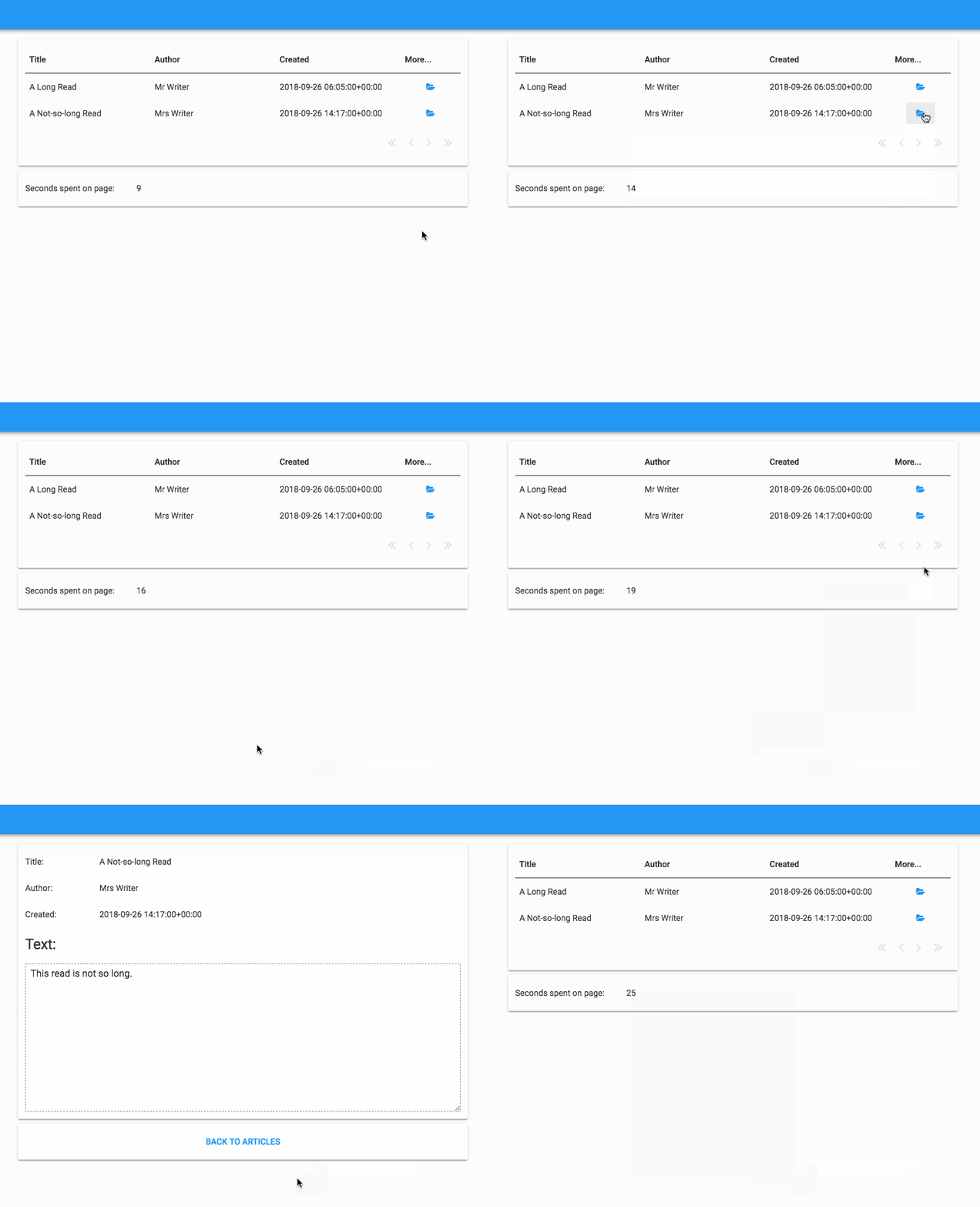
Here’s a clone link for an example app that has a Data Grid full of article summaries, with links to a full article from each row of the Data Grid. There’s a link back to the article list page from the detail page. The article list page has a timer on it, that resumes from where it left off when you browse back to the page (to show that the state of the page has been remembered between visits).

https://anvil.works/ide#clone:WBLVN2MZZIJGGUVT=DEQYLFD5H624CX7K3EB3YZBN

Let me know if that solves your problems, and if I’ve made things clear enough!

Shaun

6 Likes