Create a form using the Blank Panel template and add the following code to the constructor:
class Form1(Form1Template):
  def __init__(self, **properties):
    self.init_components(**properties)

    for i in range(5):
      self.add_component(Link(text='link %s' % i), self)
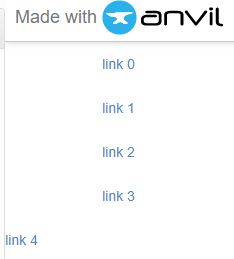
The last item in the rendered form is in the wrong position:
Also it doesn’t matter what the control you add is or even if the controls are all different, the last one is always wrong. Don’t know if that helps any.
David, can you try something? Add 2 or 3 links horizontally across the row. Does the last one (i.e. far right) line up with the links to the left of it?
Huh, that’s funny! Looks like the last link is ending up with the equivalent of full_width_row=True.
In any case, the best thing to do here is to add a LinearPanel to your blank panel form, and add your links to that instead of directly to your form.
(Blank panel forms inherit from ColumnPanel, which is primarily designed for use from the interface designer rather than from code. I’ve filed this strange ColumnPanel as a bug internally, and I’ll update this thread when it’s fixed.)