✨ Just Launched: AI in the Anvil Editor and HTML Components

If you joined today’s Anvil User Group, you are probably as excited as we are. If you missed it, here is the gist:

Build with AI in the Anvil Editor!

You can now use AI agents to build Anvil apps in the Editor. Connect your ChatGPT or Claude account and start prompting, even on their free plan.

The agent in Anvil understands how Anvil apps are structured, so it builds everything in the Python you know and with the tools you are familiar with.

Building an app with the AI agent in the Anvil Editor

Read more in the blog post or check out the docs. You can also explore the open-sourced skills used by the agent.

Build custom, on-brand UIs with HTML Components

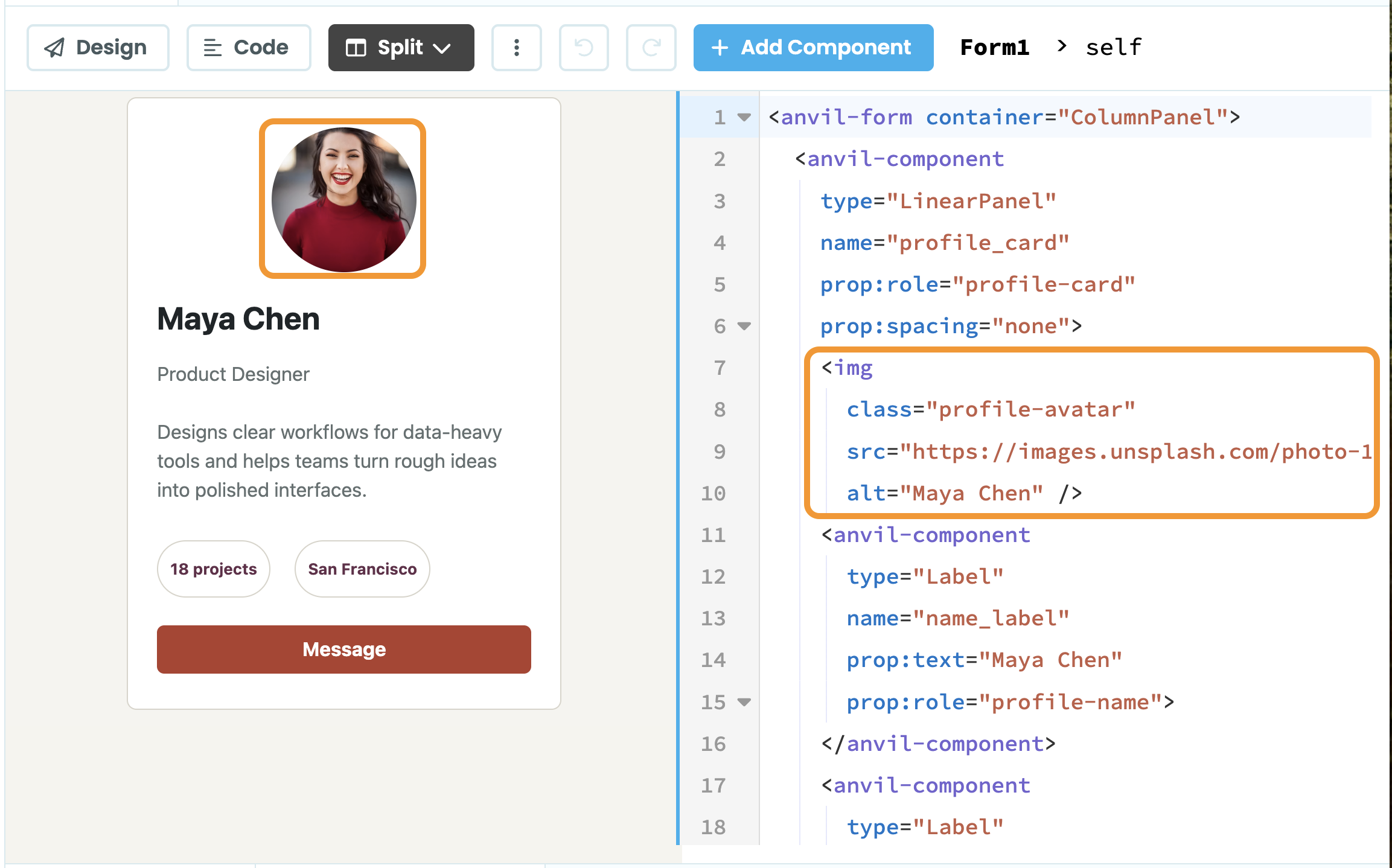
You now have access to view and edit your Form’s underlying HTML from the Anvil Editor. This lets you combine HTML elements and Anvil components in the same Form, giving you much more control over your UI.

You can also style HTML elements from the Designer and dynamically in code. You still have drag-and-drop in the Designer and can move HTML elements around visually.

If you were previously using the now-legacy Custom HTML Forms and HTML Templates, or you want to try this approach, have a look at the docs:

Both features are available in the latest version of the App Server.

We can’t wait to see what you build. Let us know what you think and share your creations below!

12 Likes

Amazing features!

Absolutely loved the showcase in Anvil User Group!

3 Likes

I couldn’t stay in the presentation, my broadband was (and still is) terrible today. Only caught one word in 20. I did, however, get the gist. I had some questions which I never got to ask :

  1. are there any plans to add local LLM support (esp. for non-enterprise users)?
  2. forgotten the other ones :slight_smile:

Oh, and with BYOK, is that just for ChatGPT & Claude?

My unofficial answer to your first question: the AI integration is great because it works out of the box. All you need to do is link it to your account.

But if you like getting your hands dirty, to the point of configuring your own local LLM server, then you can use anvil-cli together with the new skills available on GitHub.

I’ve been using anvil-cli for a while, and I plan to keep doing that. All of my Anvil apps have uplink scripts, interact with Excel VBA macros, CAD and CAM plugins, and other local resources. So whenever I add functionality to one link in the chain, I need to add it to all the links. Because of that, an AI integration that only sees the Anvil app itself does not really work for my setup.

Instead, I use Codex Desktop on my computer, with anvil-cli keeping my local repo in sync with the online one, and everything works very well.

The good news is that anvil-cli now has new goodies for LLMs, there are new skills available (which I still need to look at), and Anvil apps now speak HTML instead of YAML, which should make LLMs even happier.

1 Like

Yes, I have experimented in the recent past with anvil-cli (alongside Cursor & composer llm) and I agree, it does seem to work quite well. I suppose I was just curious.

I don’t really use Claude/claude-code anymore since I could rarely get a lot done before my 4 hour cool down period (even on expensive plans). That got quite irritating. My one dally with the API was soooo expensive that my back-of-a-fag-packet pro-rata calculation for a whole project was “£ouch!” Similar thing with ChatGPT, except there is was also quite dumb sometimes (or my prompting was). Cursor has been a breath of fresh air to me.

I use Codex with the $20 plan, plus some additional credits ready to kick in if I go over. I may switch to the $100 plan in the near future, but so far this setup has been enough for me.

To keep the cost down, keep it slow, both in the chat and in the settings. I use high reasoning mostly during brainstorming, and switch it to medium or low for regular development or small tweaks.

The most important thing, though, is having a good AGENTS.md. Whenever you see it doing the wrong thing, especially if you find yourself giving the same steering over and over, say something like:

Update AGENTS.md so this does not happen again.

Keep an eye on that file so it does not grow too large. Sometimes it will add too much detail, but overall this helps it converge very quickly toward the way you want it to work.

That said, I am not doing a lot of Anvil development at the moment. The day I restart doing more of it, this agents file will probably contain more details.

For now, I usually rely more on examples from my existing apps. I’ll say something like:

Do X, Y, and Z. I’ve done something similar in this other app. Please look at it to see how I did it, and use the same pattern.

I do the same thing when creating a new app. Instead of putting everything in AGENTS.md, I usually clone an existing app and then say something like:

This is an existing app I cloned only to use as an example. Please remove all forms, create a new form with X, one with Y, etc. Preserve user authentication, routing, style, look, and dependencies from the old app.

This is the generic part of my agents-anvil.md. It helps prevent Codex from creating too many fallbacks, validation checks, and hardening code, and it makes sure it understands that we are working with Anvil, not with a more common Python web framework:

- Follow Anvil best practices, not Django, Flask, or other frameworks.
- Avoid JavaScript when there is a Python alternative, for example use js.get_dom_node to access the DOM rather than custom JavaScript.
- When changing behavior, implement the new behavior as the only path unless backward compatibility is explicitly requested.
- When fixing reported wrong behavior, do not add hardening by default; ask first if extra hardening is desired.
- Do not add validation checks unless the prompt explicitly requests validation; allow invalid data to fail rather than adding guard clauses by default.
- When inspecting recent changes in an Anvil repo that uses anvil-cli, do not rely on plain git diff for working-tree inspection because syncing can rewrite the latest commit in real time; prefer comparisons such as git diff HEAD~1 HEAD.
1 Like

Today’s early morning prompt to claude:

Read the announcement at https://anvil.works/forum/t/just-launched-ai-in-the-anvil-editor-and-html-components and the each of the linked docs. Pay particular attention to the linked repo at GitHub - anvil-works/anvil-agent-references: agent-references - Built with Anvil · GitHub. Then consider how we best incorporate these new capabilities into this knowledge base and our existing workflow. It’s likely that some of our existing content may become redundant and almost certain that project specific AGENT.md files will need to change. Bear in mind that not all of our clients on enterprise licences will have these new capabilities available just yet as they choose when to upgrade.

5 Likes

Great stuff team! Excited for the next frontier.

2 Likes

5 posts were split to a new topic: Hiding certain modules from AI

Wow, this is very exciting! Can’t wait to test this out :smiley: