I have multiple data tables with a large number of rows and columns.
Inside the app, i have multiple .search() functions, some of them with a lot of query operators. I have noticed that on very extense tables, the query operators take a lot of time to process.
Most of the searches made dont need all of the results of the search, but only the firsts rows that match the query.
I want to include a ‘limit’ condition to the search, something like:
app_tables.table1.search(column_A=‘hello’, limit=10)
so it stops after the first 10 results are found.
Is there something like that?
You can’t make it stop, but you can tell it how many results to fetch at one time. e.g.:
app_tables.table1.search(q.page_size(10), column_A='hello')
Will fetch 10 results at a time. As long as you don’t process more than that, it won’t go back to fetch more.
That won’t do anything for how expensive the query is, though. The filtering has to be done before it returns any results, so it has to filter the entire table before giving you back your 10 results on the first page.
If you have a particular query that’s being slow you can post it and see if the folks on the forum can help you work out how to speed it up.
1 Like
This is something that i have tried that works for data tables with a date column:
data = recaudos_table.search(tables.order_by('FECHA',ascending=False),
                                    *filtros,
                                     FECHA=q.between(datetime.now()-timedelta(days=(90 if  self.busquedaRapidaHistorial.checked else 9000)),
                                                      datetime.now()+timedelta(30)))

filtros.append(q.any_of(
                NUM_VENTA=int(valor_filtro) if valor_filtro.isdigit() else None,
                CLIENTE=q.ilike(f"%{valor_filtro}%"),
                MEDIO=q.ilike(f"%{valor_filtro}%"),
                NUM_FACTURA=q.ilike( f"%{valor_filtro}%")
            ))
Basically, I added a checkbox that starts being checked so the query searches just the data uploaded in the last 3 months. When the checkbox ix checked the query time is around 4 seconds. But when it is not, it takes around 60 seconds.
The ‘Filtros’ conditions are always on. I liked this approach but i want something similar for the tables that dont have a ‘date’ column.
1 Like
I’ve never seen 60 seconds for a query!
I see that you use ilike with % at the beginning of the string. If you have a dedicated server, you may find some improvements creating pattern matching indexes:
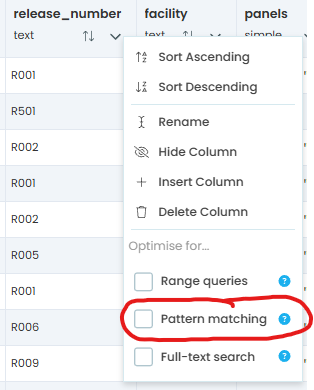
sadly, i dont have a dedicated server now…
Another approach you might consider:
In one of my apps, I had a table that recorded daily requests. Over the years, it grew to tens of thousands of rows and got slower and slower. I wanted to keep the historical data for reference, but for daily operations, I only needed the most recent few days.
To solve this, I split the data into two tables: requests and requests_history. A nightly scheduled task moves any request older than one week from requests to requests_history, and then deletes it from requests.
The application continues to work exactly as before, querying requests for daily work, while admin tools query requests_history for long-term reporting.
This approach is faster than simply limiting query results to a small number, because the database doesn’t need to scan and filter old data, it simply isn’t there anymore. At the same time, no features are lost, since the full historical data is still available when needed.
5 Likes