I’m looking for ideas on how to improve the UI of one of my Anvil apps, ideally in a way that feels “Anvil-ish” and reusable.
I could just brute-force it (ask an LLM, get something working, move on), but I’d like something cleaner that I can reuse later.
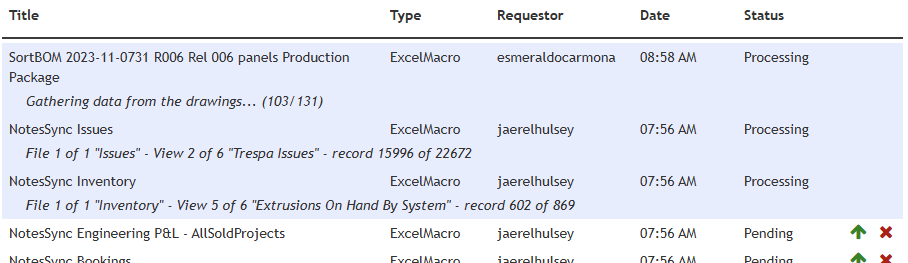
I have a Queue Manager app where tasks report their status as plain text, including progress. This is what it looks like now:
And this is more what I’d like it to look like:
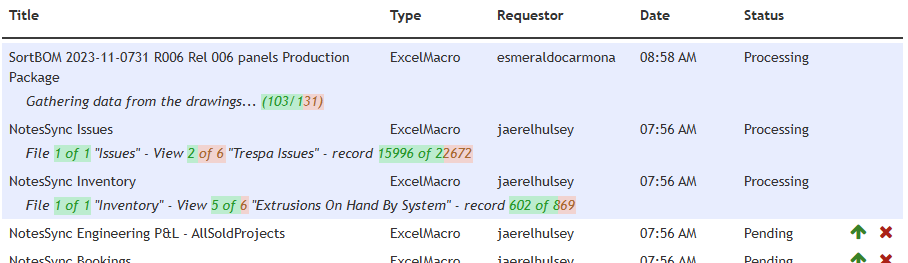
My idea was to post-process the text, look for something like:
(\d+)\s*(?:of|\/)\s*(\d+)
and then turn that into a progress-bar-style background.
I’m pretty sure I can write a function (with some AI help) that finds those patterns and swaps them with a styled div, but it feels a bit hacky and not very “Anvil”.
So I’m thinking:
- Make a custom component with
ValueandMaxValueproperties, use aRichTextcomponent with slots, and somehow inject the component where the progress appears - Write a function that replaces each progress bit with a styled
div, and wrap that as a reusable component - Just do the quick post-processing for this app and not worry too much about reuse
Has anyone done something like this? What would you go with?