Hi folks! I’m hitting a rate limit for Google Sheets API and I’m wondering if it’s our limit or a global limit… and what my options are in either case.
What I’m trying to do:
We have an app that adds about 200 rows to a Google Sheet by doing:
    for thing in list_of_things:
        my_sheet.add_row(**thing)
where len(list_of_things) is ~200.
What I’ve tried and what’s not working:
We’re getting this error:
InternalError: Google request failed: Quota exceeded
for quota metric 'Read requests' and limit
'Read requests per minute per user' of service
'sheets.googleapis.com' for consumer 'project_number:(redacted 13 digit int)'.
at , line 1
called from anvil-services/anvil/google/sheets.py, line 205
called from anvil-services/anvil/google/sheets.py, line 164
called from anvil-services/anvil/google/sheets.py, line 173
called from Form1, line 60
I think doesn’t happen every time, but most times.
What it might be or might not be
Is it a global Google API throttle shared among all Anvil apps? Or does each Anvil account have its own Google API usage limit? (or is it even per-app?)
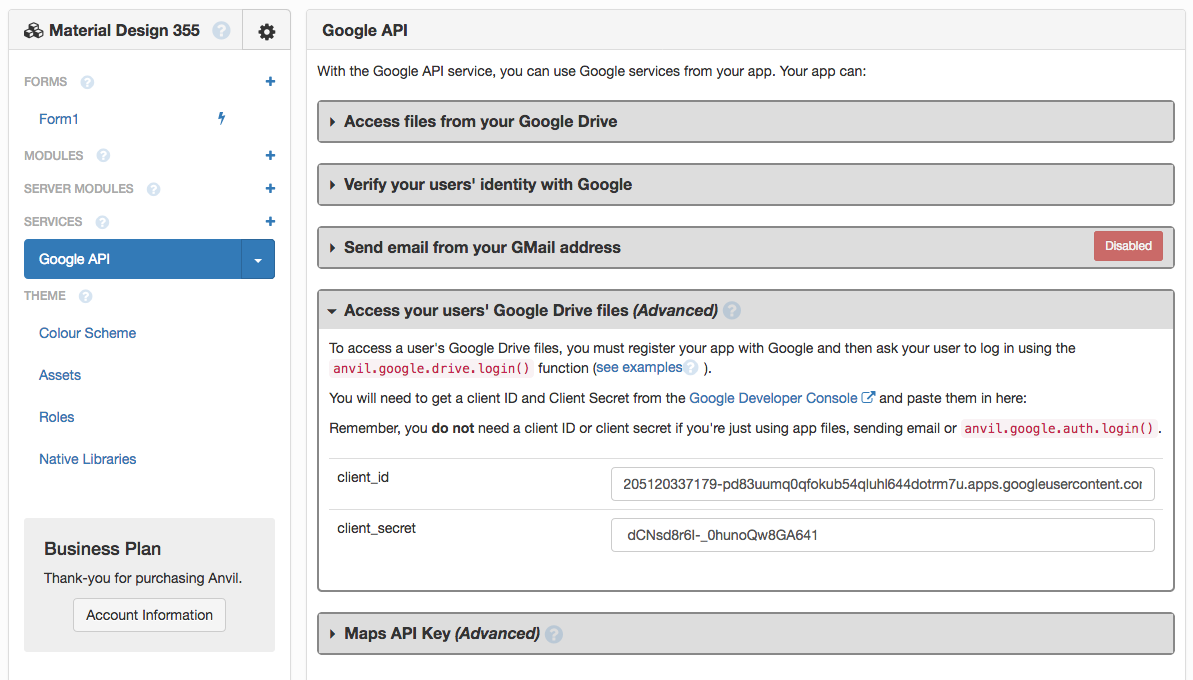
Once you add your Client ID and Secret to the Google Service configuration, the Sheets API call will use those credentials and be subject to whatever quota you have for your Google project. You can check your limits here: Google Cloud Platform
I have hit this limit before I ever heard of anvil.
The easiest way to get around a google call limit, is to construct all of the data on your side that you would like to add as one object that is digestible by a google api (using googles api library on your side) and then sending it all at once in one call.
They never seem to care about an amount of data transmitted, only about the high frequency of calls.
Just from anecdotal experience, it seems like they (google) will throttle faster the faster you send them calls.
in every iteration of
Its trying to send an object as fast as python can send it.
Here is some code I use to upload 1k or 2k, 5k etc. rows multiple times a day every day from an inventory program:
    if row_list_data:
        # row list data is a list of rows as lists
        for i, _  in enumerate(row_list_data[0]) :

            cell_list = gsheet.range(1, i + 1, len(row_list_data), i + 1)
            gsheet.cell
            for cell, row_list_data_cell in zip(cell_list, row_list_data):
                cell.value = str(row_list_data_cell[i])

            response = gsheet.update_cells(cell_list, value_input_option="RAW")
            # I have to send this as raw only because i need google sheets to
            # not auto format leading zeros on a barcode scan

            #print(response)


    else:
        print("Empty Data Sent to Function: 'upload_as_gsheet'  !!!!")
        return False
Edit: for this to work in one shot you have to make sure the size of the sheet is already the exact size or larger than the data you want to update using:
@ianb Thanks for the suggestion! That’s probably the way to go but it would be interesting to know about how to use one’s own quota in the Anvil version of the API anyway (seems like the slightly lazier, i.e. preferable, approach!)
I agree, In my world the lazier approach is never getting the 1000 phone calls for all of the little one off things I made for people that broke ‘because google’ one future day