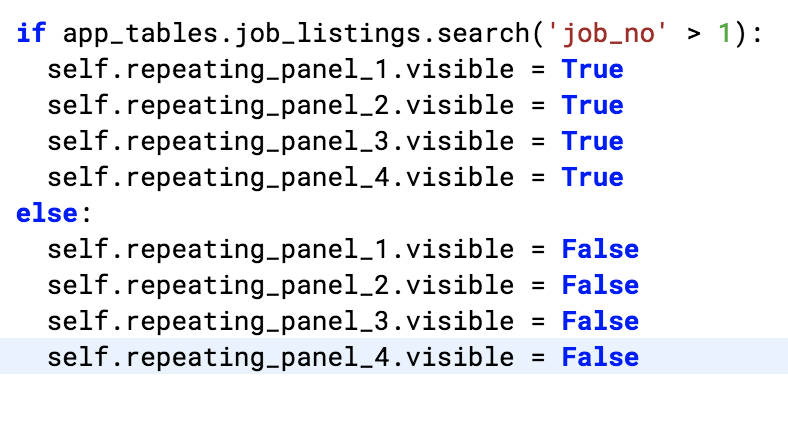
Hi, I’ve got a 4 repeating panels bound to 4 fields in a data table, and I want make the rows of the data table visible based on certain criteria, as if I was using a SQL where statement.
Here’s what I was attempting - to display only rows in the data table with a job number (job_no) greater than 1. Even though I can get the code to run, it is not performing as expected, it’s either displaying all rows, or throwing an error.
Not placing the field name in quotes throws a field not defined error…
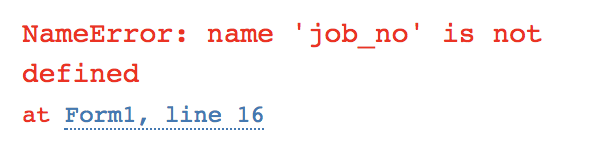
Maybe using the visible ‘truthiness’ is not the correct way to filter? Thanks in advance for any help!
Any chance you could post the clone link here (or PM me)?
I might understand better if I can see the project.
cheers,
Hi @ian.monat,
It’s a bit unusual to be using four separate repeating panels, one for each column. Is there a particular reason you’re doing this? Much more usual is to have one repeating panel with four Labels in it, each bound to a different column of the data table. Then you can give a list of database rows to that RepeatingPanel, and it will repeat those four labels for every row in the table.
In any case, the kind of filtering you’re doing is easiest with a Python list comprehension. Something like so:
    rows = [row for row in app_tables.job_listings.search() if row['job_no'] > 1]
    self.repeating_panel_1.items = rows
Thank you @david.wylie and @meredydd,
The only reason I was using 4 separate panels was I didn’t know multiple labels could be placed into a single repeating panel. I tried it, works great, list comprehension is working too, thanks again!
1 Like