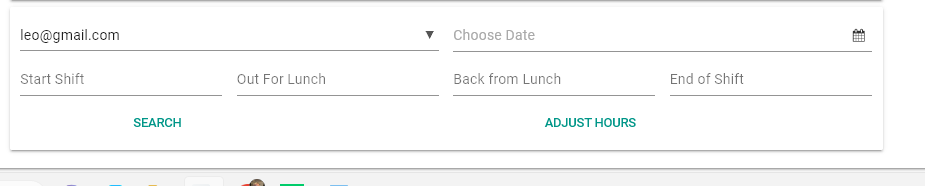
What I’m trying to do:
I am trying to create a feature to search for the employee clock in/out and to adjust it.
I manage to get it to search and find the record. What I am stuck on is adjusting the hours.
What I’ve tried and what’s not working:
What is not working is adjusting the hours.
Code Sample:
    date = self.date_picker_employee_shift_adjustment.date
    str_date = date.strftime("%m-%d-%Y")
    find_lead = app_tables.clockinoutsystem.get(q.all_of(Users=self.drop_down_employee_shift_adjustment.selected_value,Date=str_date))
    startshift_str = self.text_box_start_shift.text
    startshift_datetime = datetime.strptime(startshift_str,"%y-%m-%d %H:%M:%S")
    print(startshift_datetime)
    #if find_lead['Clock_In_Start'] != self.text_box_start_shift.text:
I keep getting this error
ValueError: time data ‘2022-11-28 11:53:00-08:00’ does not match format ‘%y-%m-%d %H:%M:%S’ at [admin_haga_system, line 329]
I am trying to figure out what this “-08:00” that seems to be added in the data table means. How do I get rid of it or at least format it correctly?
Clone link:
share a copy of your app
That’s the time zone offset. See Dealing with timezones for why this information is added. Also, search Forum for posts about time zones.
Anvil does quite a lot to help deal with dates and datetimes, which are frankly just awful to work with. The problem you’re facing is an example of that (and just one example… I mean truly AWFUL).
I really suggest you deal with dates and datetimes as date and datetime objects. Anvil Datatables provide column types for both of these datatypes, and the date picker can be used with both (if you toggle on the pick_type attribute it will require a datetime). Coercing to/from strings is going to lead to a lot of headaches.
2 Likes
I know the headaches @danbolinson , but unfortunately, I wrote it this way and didn’t know how else to go about it. I am eager to learn if there is a simple way to create a time clock system.
I am not sure if that is what is wrong with the formatting really. Can you tell me anything from the error message? I am so lost here.
I am. I recognize it from scores of examples, including some in Python’s own documentation of datetime.isoformat(). Check it out for yourself here.
If your date strings are reliably in ISO format, perhaps datetime.fromisoformat() may be of use.
The obvious seems to elude me here @p.colbert. I went back and tried to look at the striptime() formating again. I think this should be right => %Y-%m-%d %H:%M:%S-%z, but it still does not recognize it. I am not sure how to use datetime.isoformat() working from strings to dates and back again. @danbolinson was right on how complicated this process really is, at least for noobs like me.
Since your timestamp strings seem to be in standard ISO format, you can let fromisoformat worry about the details of strptime, so you don’t have to.
Try typing these examples on your desktop (>>> is Python’s command prompt):
python
>>> from datetime import datetime, timedelta
>>> startshift_datetime = datetime.fromisoformat( '2022-11-28 11:53:00-08:00' )
>>> type(startshift_datetime)
<class 'datetime.datetime'>
>>> startshift_datetime
2022-11-28 11:53:00-08:00
fromisoformat should eliminate that need for strptime altogether. And if strptime isn’t there, then you can’t get its format string wrong.
1 Like
It worked! Thank you so much @p.colbert