What I’m trying to do:
See the full vertical extent of a branch.
What I’ve tried and what’s not working:
Tried: Viewing the Version History.
Not working: It shows
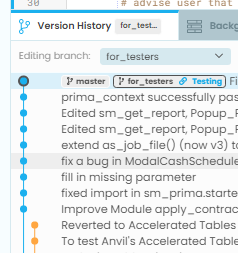
Since the orange line is for the “for_testers” branch, shouldn’t it reach all the way to the top?
If for_testers is the orange branch, then that means you currently have commits saved to the master branch that is ahead of the for_testers branch.
It looks liker there are also changes in the for testers branch that are not merged with the master branch.
If you want to bring for_testers to the tip, you should which to that branch, which you are in the image above, then right-click on the master branch and select merge.
You may want to take a closer look at the top line of the Version History. Both the blue “master” and orange “for_testers” branches are pegged to the exact same commit. So at that point, they are in full agreement.
1 Like
I think you’ve already diagnosed your own problem here, but to be clear for readers: In this screenshot, the orange line is not the for_testers branch! In Git, branches are pointers to particular commits, and both master and for_testers point to the same commit.
The orange commits appear to be abandoned commits to which no branch is currently pointing. (In vanilla git, those commits just disappear when you switch the branch to point somewhere else; in Anvil we deliberately keep them around so you can use them later if you want to.)
2 Likes