Dear all,
thanks for your great product. We intend to use the app server to have our app local running. For development/debugging and testing it would be hepful to access the data stored in the datatables.
When using the online editor I can do that via the data tables service directly in the browser.
When working locally I can connect from a client (let’s say pdadmin or dbeaver) to the postgres database. but there are some problems:
- the minor one is that the post changes every time I restart the server. I didn’t figure out how to set a fixed port for that
- I see in the Schemas the datatables but now tables/data
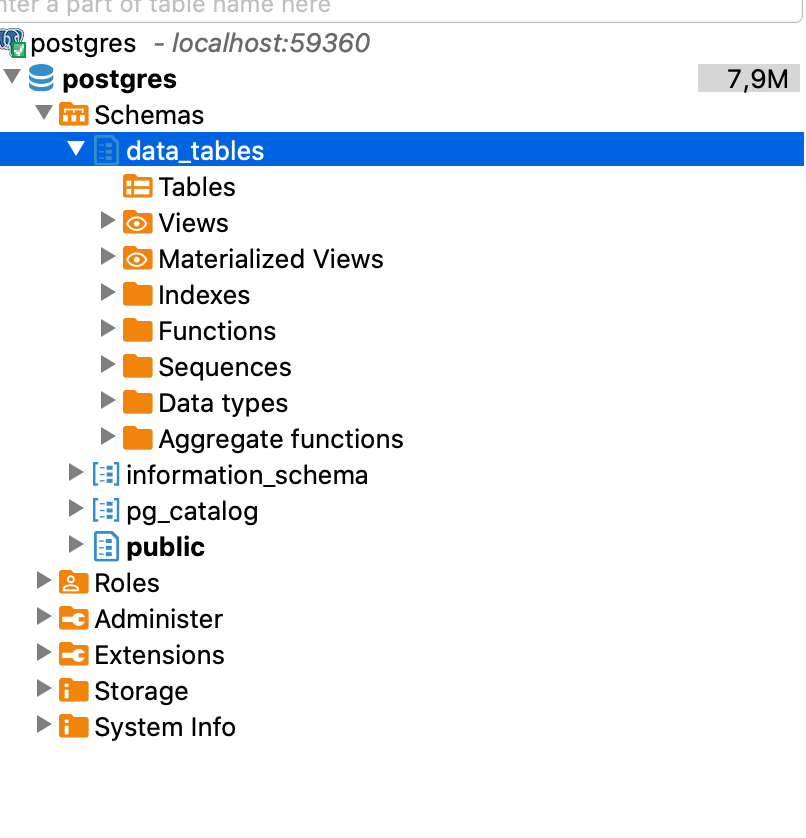
I can write and read from the postgres database using anvil.tables modul. So data are stored and can be queried from the database.
As far as I understand anvil uses the json features of postgres, so data are not stored in “real tables”. How can I still access them in a useful way (as above mentioned for debugging, testing, development).
Thanks in advance