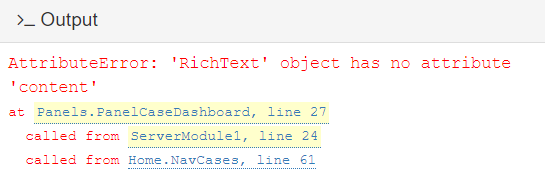
Since you want both functions to refer to the same instance, let’s give it a (durable) name, at the point where it is created.
Old way:
get_open_form().panel_main.add_component(
  Panels.PanelCaseDashboard(),   # creates a new dashboard as 1st argument
  full_width_row=True
)
New way:
# create new dashboard, and preserve a reference to it as a new member of self:
self.panel_case_dashboard = Panels.PanelCaseDashboard()
# make the new dashboard part of the currently-displayed form:
get_open_form().panel_main.add_component(
self.panel_case_dashboard,
full_width_row=True
)
Old way:
  def update_panel_cd_center(self):
    Panels.PanelCaseDashboard().panel_cd_center.add_component(Panels.PanelAgenda)
New way:
  def update_panel_cd_center(self):
    new_agenda_panel = Panels.PanelAgenda()
    # add the panel to the correct part of the form:
    self.panel_case_dashboard.panel_cd_center.add_component(new_agenda_panel)
self.panel_case_dashboard works, in this case, because both update_panel_cd_center and link_case_dashboard_click refer to the same self object, that is, the same Form. If these functions belonged to two different objects, then there would be more “navigation” or “lookup” code, to find the right containing object.
If there’s any chance that update_panel_cd_center will be called before link_case_dashboard_click, then we have to be more careful. In that case, self.panel_case_dashboard won’t have been assigned yet. In that case, set self.panel_case_dashboard = None in __init__. This will at least ensure that the variable self.panel_case_dashboard reliably exists when update_panel_cd_center is called, even if it doesn’t always contain a useful value. Then we can amend our last function as follows:
  def update_panel_cd_center(self):
    if self.panel_case_dashboard:
      new_agenda_panel = Panels.PanelAgenda()
      # add the panel to the correct part of the form:
      self.panel_case_dashboard.panel_cd_center.add_component(new_agenda_panel)
Note: I didn’t bother with adding new_agenda_panel to self. (You could, if you need to refer to it later, from other functions.) As it stands above, variable new_agenda_panel will cease to exist when its enclosing function returns. However, self.panel_case_dashboard.panel_cd_center will still retain a reference to the object, in its internal list of components, so the panel itself will “stay alive”, as intended.
I hope this resolves the class/instance confusion. JavaScript code often doesn’t make much of a distinction, so it pops up here from time to time. Python is more like Java and C++ in making a hard distinction.
You may have similar situations in other parts of your code.
Edit: I edited the above code for illustration purposes only. Errors (if any) are entirely my fault, and are left as an exercise for the reader to resolve.