

Introduction to GUI and Server Programming
Contents:
Intro to GUI programming
If you’re used to writing Python scripts or using Jupyter notebooks, you’re used to code that runs once from beginning to end. GUIs (Graphical User Interfaces) aren’t like that. In a GUI, code runs because some event has happened – for example, when the user clicks on a button.
In Anvil, you design your pages (Forms) with the drag-and-drop designer. Then you write the event handlers as Python methods, in the code attached to your Form.
For example, here is how to place a button and then set up some Python code that runs when it’s clicked:
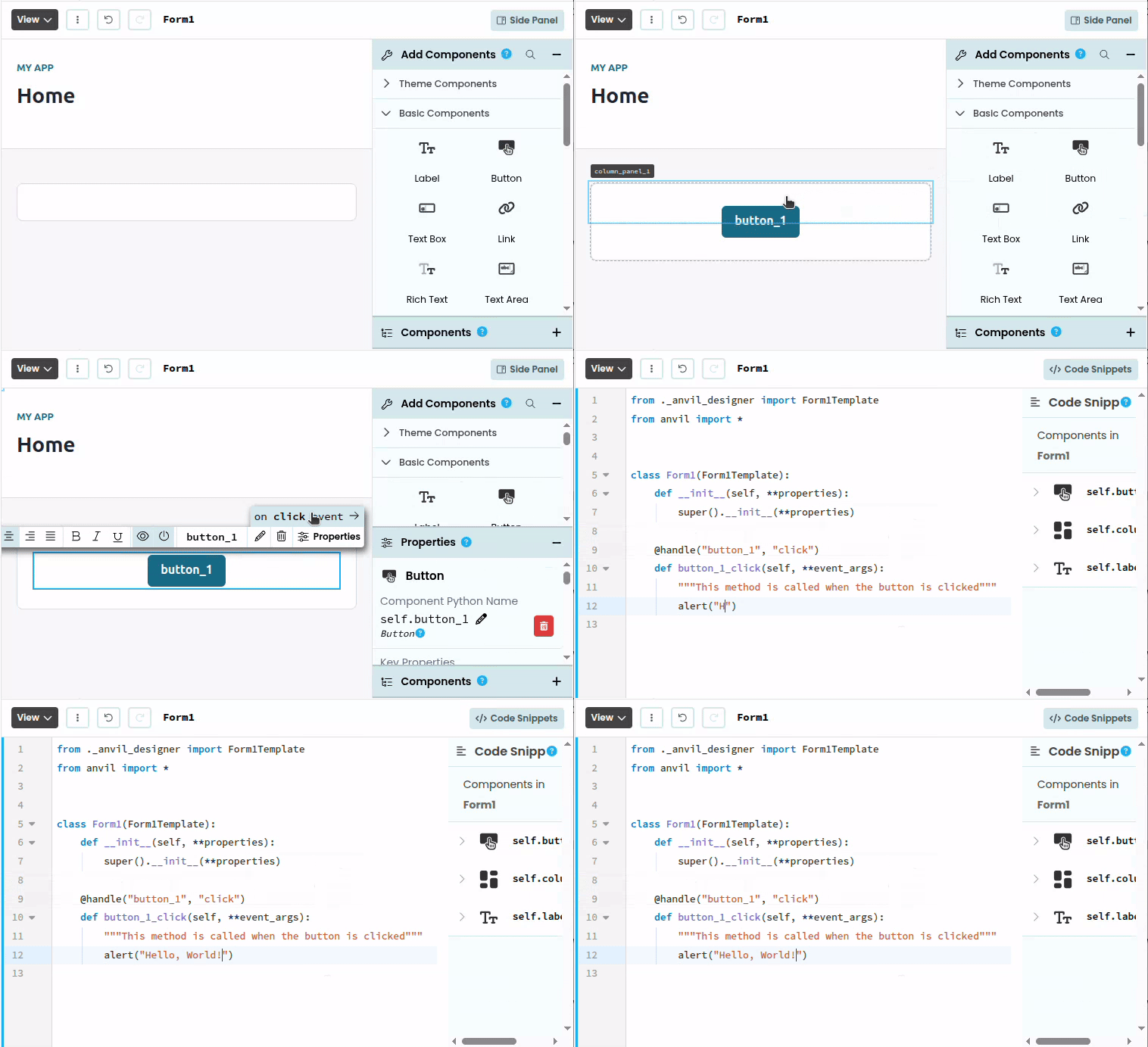
Creating a button and creating an event handler
Try it yourself
Building your first GUI code with our tutorial:
Intro to server programming
Your event handlers – in fact, all the code in your Forms – runs on the user’s computer or phone, in the web browser where thy open your app. To do the heavy lifting, to control who can do what, or to use packages you’ve installed from PyPI, you’ll need server code.
Code in your Server Modules runs on Anvil’s computers, where your users can’t see or influence it. You can define “callable functions” in your Server Modules, and call them from your client-side event handlers. For example:
# This code goes inside a Server Module

@anvil.server.callable
def send_feedback(feedback_text):
    # Write to the database (privileged operation, trusted code only)
app_tables.feedback.add_row(feedback=feedback_text) # This code goes inside a Form.
# It assumes you've placed a Button named button_1 and a TextBox named feedback_box.
@handle('button_1', 'click')
def button_1_click(self, **event_args):
anvil.server.call('send_feedback', self.feedback_box.text)Try it yourself
Build a server-client app with our tutorial:
Intro to database programming
Most programs need to store data – information users have submitted, uploaded files, user accounts…whatever you need.
This is done with a database: a set of tables with fixed columns where the code can create new rows, search for rows with particular column values, and edit existing rows.
Anvil comes with a powerful built-in database called Data Tables. Rows in Data Tables are Python objects – you can return them from server to client code and pass them back again. You can even define your own Python classes for the rows of each table, to add extra functions and attributes.
Try it yourself
Learn to use Data Tables with our tutorial:
Or read the full documentation to learn about advanced features:
Learn more
If you want to get to grips with Anvil, check out our full range of tutorials:
Or dive into our reference documentation:
Do you still have questions?
Our Community Forum is full of helpful information and Anvil experts.