The Repeating Panel in my Data Grid is showing some columns blank and is showing errors in other columns. What could be the possible causes of these issues?

Thanks!
The Repeating Panel in my Data Grid is showing some columns blank and is showing errors in other columns. What could be the possible causes of these issues?
Thanks!
Hi cgl, welcome to the Forum!
I think the key here is that each row of a Data Grid is a Form itself - it’ll be called something like RowTemplate1. That Form has its own Python code and you can do anything you can do in a normal Form. It has a special variable called self.item that contains the data for the row it represents. So you just need to figure out how to write the correct Python expression to get the data into your Data Grid how you want it.
I think you’ve dropped a Label into the column. To get your data into the Label, click on the Label and set up a Data Binding that binds its text to whichever column you want to display.
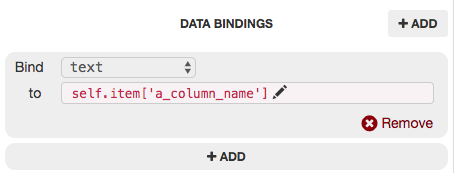
If you want to do this in the code instead, you would do it in the __init__ of the Row Template’s class:
class RowTemplate1(RowTemplate1Template):

  def __init__(self, **properties):
    # You must call self.init_components() before doing anything else in this function
    self.init_components(**properties)

    # Any code you write here will run when the form opens.
    self.label_1.text = self.item['a_column_name']
(You can set the Label’s text to anything you like, it doesn’t have to be just the contents of a Data Tables cell.)
LiveObject situationI think that particular column is a link to another table, so you need to tell it which column from the other table to display.
Let’s say you’ve got a table called Employees that links to a table called Teams using a column called team. If you do:
print(app_tables.employees.get(name="Bob")['team'])
You’ll get <LiveObject: anvil.tables.Row>, just as you’re seeing in your Data Grid.
Instead, you want the Data Grid to display the appropriate column from the Row that you’re linking to. In the Employees/Teams example, the Teams table might have a column called team_name, so you could do:
print(app_tables.employees.get(name="Bob")['team']['team_name'])
Which would print the name of the team that Bob is in.
For your Data Grid, you can drop a Label in to that column, then set up a Data Binding like:
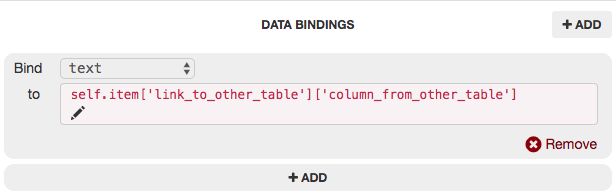
Here’s a clone link for an app that does something along those lines:
https://anvil.works/ide#clone:P6CLMZRC5WJ7EJOJ=XRA5FDD6TIRNALXAQKDDAYXV
Does that make sense?